Features / Dashboard
An Allegro seller dashboard with a list of today's tasks
When you sign in, you see the orders to ship, messages and returns with a deadline, and below them the sales and profit of the period you pick.
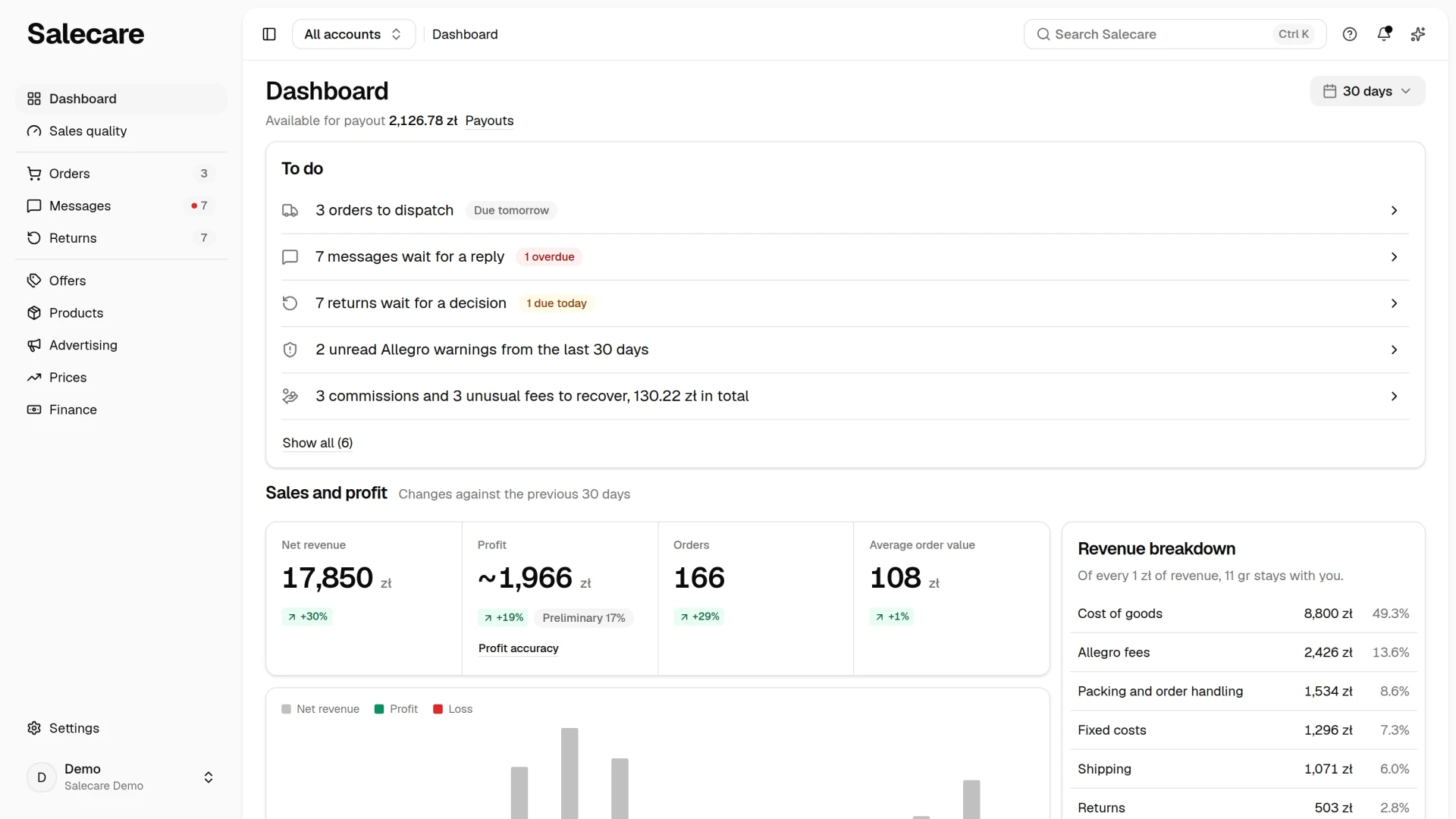
The Dashboard starts with tasks due today and overdue ones
-
Tasks with a deadline
The To do list gathers orders to ship, unanswered messages, returns waiting for a decision, Allegro warnings, money to recover and negative ratings. Orders, messages and returns show how many are overdue or due today.
-
Sales and profit for the period
Net revenue, profit, the number of orders and the average order value. From the Pro plan every figure shows its change against the previous period of the same length.
-
What stays from every 1 zł
The Revenue breakdown card lists the costs from the largest, each with its share of revenue, and says how much of every 1 zł of revenue stays with you.
The first figures usually appear a few minutes after you connect your account
What you need
A connected Allegro account. On large accounts the first figures take more than an hour.
Where the limits are
A profit with a ~ sign is worked out partly from estimated costs. The Profit accuracy link shows which data is missing.
Questions about the Dashboard
I have several Allegro accounts. Will I see them together?
Which period does the Dashboard show?
Check these features too
See your tasks for today and your profit over the last 30 days.
14 days free, no card.