Where is the reconciliation of a month?
Open Finance and the Reconciliation tab. The page opens on the previous full month, because the books are kept by the month. You change the period beside the tabs, also to any date range, and the page remembers it apart from the other Finance tabs. The account switcher at the top of the page narrows the reconciliation to one Allegro account.
How do you reconcile a whole period?
The Reconciliation tab holds the Period reconciliation card. It sets the sales, the Allegro wallet and the Allegro settlements of the period picked above the cards side by side, the way you reconcile a period by hand, and does it per currency. A wallet in koruna or euro has its own block and is never added to the zloty. The period is whole days in Polish time.
At the top of the block is the Balance of the period, with "The wallet matches Allegro" or "The wallet differs from Allegro by" and the difference beside it. Below, the sales, the wallet and the fees are in two columns, and under them, across the whole block, the Balance of the period step by step.
When Salecare does not read the Allegro settlements in the currency of an account's wallet, the block of that currency shows the wallet alone, without sales, fees and balance, with a sentence above the wallet saying that Salecare does not read the Allegro settlements in that currency. This happens with a wallet in koruna, euro or forints of an account registered in Poland.
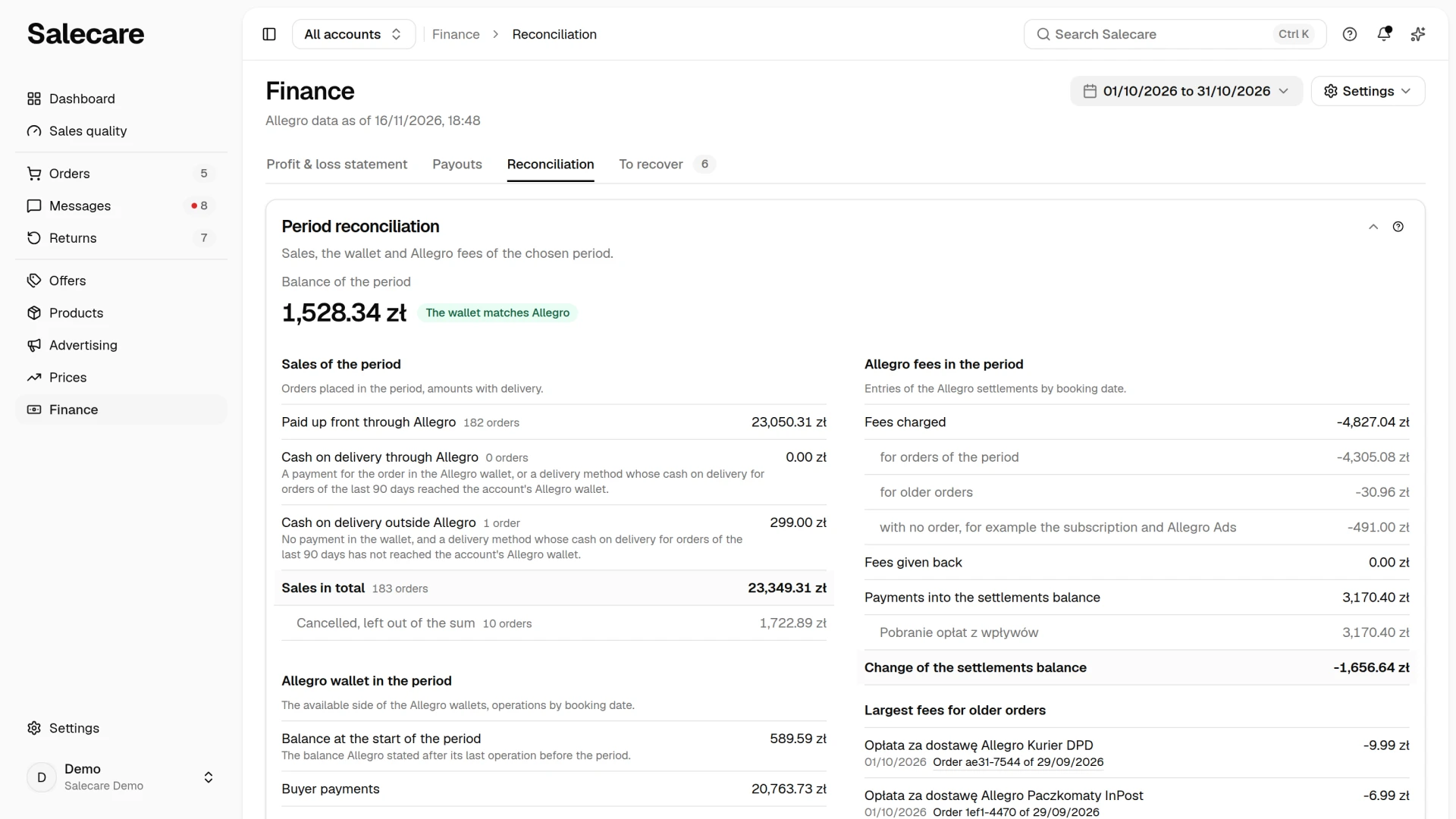
Sales of the period are the orders placed in this period. An order's amount is what the buyer was to pay, delivery included.
- Paid up front through Allegro are the orders paid at checkout.
- Cash on delivery through Allegro are the orders paid on delivery with a payment for them in the Allegro wallet, or with a delivery method whose cash on delivery for orders of the last 90 days reached the account's Allegro wallet, the same rule as for Cash on delivery on its way. They split into the orders whose money was in the wallet by the end of the period, reached it after the period, and still have no payment in the wallet.
- Cash on delivery outside Allegro are the orders paid on delivery with no payment in the Allegro wallet and a delivery method whose cash on delivery for orders of the last 90 days has not reached the account's Allegro wallet, for example parcels sent on your own contract with a carrier.
- Bank transfer and other payments are the orders paid by a transfer to the seller's account or by a payment of another kind.
- Sales in total adds up these groups. Cancelled and unpaid orders stand under the sum on their own and are left out of it.
Allegro wallet in the period is the available side of the Allegro wallets, with the operations by booking date.
- Balance at the start of the period is the balance Allegro stated after its last operation before the period, added up over every wallet in that currency.
- Buyer payments and Refunds to buyers split into money for orders of the period, for older orders and with no order in Salecare.
- Seller's payments are payments for which Allegro names your own Allegro account's login as the payer, not a buyer. Salecare does not count them as buyer payments.
- Fees taken from payments are the fees Allegro took out of the payments in the wallet. Financing instalments get a line of their own when the wallet has them.
- Payouts of money from before the period and Payouts of money from the period split the payouts of the period. Salecare counts the money from before the period as leaving the wallet first, in each wallet on its own and in booking order.
- Other operations are holds and their releases, corrections, compensation and similar operations, each by its Allegro name.
- Balance at the end of the period from the operations is the balance at the start with every operation of the period added, and Balance at the end of the period stated by Allegro is the balance after the last operation of the period.
When the two end balances are equal, "The wallet matches Allegro" stands beside the balance. When they differ, the badge and a box under the wallet show the difference, the amount by which the operations of the period in Salecare do not add up to the balance Allegro stated. Then compare the operations of the period with the operation history in Allegro. Operations on the Pending side stand apart on the Pending, outside the balance line and are not part of the balance.
Allegro fees in the period are the entries of the Allegro settlements by booking date.
- Fees charged split into fees for orders of the period, for older orders and with no order, for example the subscription and Allegro Ads.
- Fees given back are the fees Allegro returned, for example a commission after a return.
- Payments into the settlements balance are the fees Allegro took from incoming payments into the settlements balance and the seller's own payments into it, each entry by its Allegro name, for example the fees Allegro collects from incoming payments.
- Other settlement bookings are the other entries on the settlements balance, for example a payment refund booked in the settlements, each by its Allegro name.
- Change of the settlements balance adds up every entry of the period.
Under them stand the Largest fees for older orders, up to five, with the Allegro name of the entry, its date and the order it belongs to.
The Balance of the period step by step sits under both columns and leads from the sales to the balance of the period. Lines with nothing in them are left out, and the subtotals and the balance always stay.
- Sales through Allegro are the orders of the period paid up front through Allegro and on delivery through Allegro.
- Cash on delivery not in the wallet by the end of the period takes off the cash on delivery through Allegro whose money reached the wallet after the period or has not reached it yet.
- Payments outside the sales and other differences is the rest up to the payments for orders of the period, for example a payment for a cancelled order or an order placed at the end of the period and paid after it.
- Payments for orders of the period adds up these three lines and equals the same amount in the wallet.
- Then come Refunds for orders of the period, Payments for older orders, Refunds for older orders, Payments with no order in Salecare, Refunds with no order in Salecare and Seller's payments, and with them the sum Payments after refunds.
- From it the balance takes off the Allegro fees after fees given back, with the fees for older orders on a line under them, and the Payouts of money from the period, and adds the Refunds and fees paid from money from before the period, the part of the balance at the start of the period that refunds, fees and other operations took before a payout did.
- The Balance of the period closes the list.
When no money of the period is left in the wallet and nothing else changed the balances, the last line is the Change of the settlements balance, at the same amount as the balance. Otherwise, under the balance, What the balance is made of shows where that money is.
- Change of the settlements balance is negative when Allegro charged more fees than it took out of the payments in the period.
- Money of the period left in the wallet is the balance at the end of the period less what is left of the balance at the start.
- Other wallet operations appear when instalments, holds, corrections and similar operations changed the wallet. A hold still in place at the end of the period stands here as a positive amount, because it took money out of the wallet.
The Total line adds up these amounts and always equals the balance of the period. For example, at the start of the period the wallet held 2,400.00 zł from older sales, and Allegro paid it out at 0:40 on the first day. Payments after refunds came to 1,100.00 zł, fees to 350.00 zł and payouts of money from the period to 600.00 zł, so the balance of the period is 150.00 zł. The wallet ended the period at 0.00 zł, so the balance step by step ends on the Change of the settlements balance line at 150.00 zł.
Which files does the accountant get?
Below the reconciliation is the Files for the accountant card with five files:
- Period reconciliation summary for the chosen period, as PDF. Each Allegro account and each currency gets one page in it with the sales, the Allegro fees, the wallet from its opening to its closing balance, whether the wallet matches Allegro, and the date of the data.
- Allegro settlements and fees for the chosen period, as CSV, Excel or PDF.
- Allegro wallet operations for the chosen period, as CSV or Excel.
- DAC7 statement and DAC7 refunds and cancelled orders for the whole year in which the chosen period ends.
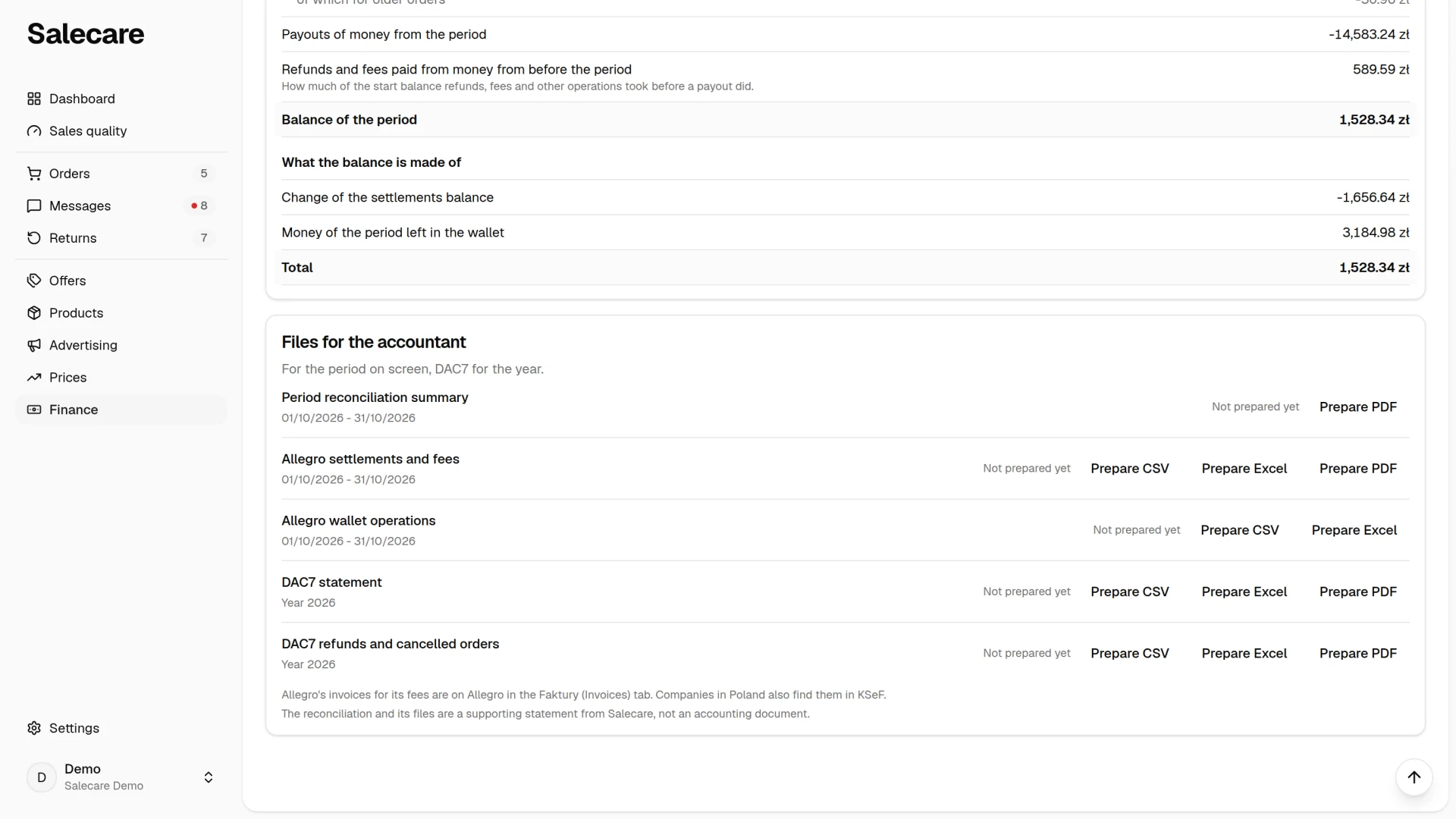
Click Prepare with the format you want. The file is made in the background, and when it is ready a Download button appears beside its row. A ready file can be downloaded for 7 days, after that you prepare it again. Salecare keeps the figures it is made from for as long as you have an account, so you can prepare the file of any month of the history at any time.
Salecare does not fetch Allegro's invoices for its fees. They are on Allegro in the Faktury (Invoices) tab, and companies in Poland also find them in KSeF.
How do you give the accountant access?
The accountant is an ordinary team member. Invite her in Settings > Team and give her the Accounting set. The set holds one permission, Reconciliation and documents (view), so the accountant sees only the Reconciliation tab and downloads its files. The files carry order numbers but no buyer logins. The accountant opens no order pages, sees no margins or other modules and changes nothing on Allegro, and takes a seat in the team like any member.
One e-mail address can have an account in only one company in Salecare. An accountant who keeps the books of several sellers needs a different address at each of them.