How to track competitor prices on Allegro
You can check competitor prices on Allegro in three ways. By hand, in the Allegro search and on the product page. With the Allegro price rule "Lowest price on Allegro", which changes the price of your offer by itself but does not show who is cheaper or by how much. Or in Salecare, which every hour reads the prices of the other sellers of up to 10,000 of your products and sets them against your purchase price. The guide is for sellers. Salecare does not show a buyer the price history of a product.
As of 30 October 2026, according to Allegro, how the pricing rules based on Lowest price on Allegro work.
If a padlock saying "Not available on your account" stands next to Competition and the Salecare mode, these features are not switched on for that account. Allegro automation can still manage the price.
How do you check competitor prices on Allegro by hand?
Type the EAN code of your product or its name into the Allegro search and sort the results from the lowest price. Allegro groups the offers of the same product from the Allegro product catalogue, so the product page usually shows the offers of other sellers too. For a few offers that is enough. For a few hundred, a comparison by hand is out of date before you finish it, because competitors change their prices during the day, and some of them do it automatically, every hour or more often.
What should you look at when comparing prices?
- The same goods. One EAN code is sometimes shared by a whole family of goods, so a single item or another size can stand next to your set. Read the offer title before you count it as cheaper.
- The same condition. Used, ex-display, damaged or returned goods do not compete with new ones.
- Item price and delivery. An offer 3 zł cheaper but with delivery 10 zł dearer is not cheaper for the buyer. Compare the item price and what the buyer pays for delivery separately.
- Auctions and your own accounts. The price of an auction is the current bid, not a price anyone can buy at. Your own Allegro accounts are not competition for each other.
- Whether it pays. A competitor's price says nothing about your profit. Before you lower your price, work out what is left after the commission, the Smart! fee and the cost of goods, following the guide How to calculate your Allegro margin.
Does Allegro track competitor prices itself?
Allegro has the price rule "Lowest price on Allegro", which you switch on in Sales Center. Every hour it works out the lowest price of the product among active Buy now offers linked to the Allegro product catalogue and delivered free to the buyer, and sets the price of your offer to that amount, always within the minimum and maximum price you give it. Without that range the rule does not change the offer. Allegro leaves out delivery costs, coupons and sets.
When the highest and the lowest price of the product differ by more than 50%, or the lowest price moved by more than 30% against the median of the last 14 days, Allegro does not work out a lowest price and your price stands still.
The rule changes the price, but it does not show who is cheaper, by how much or since when. You give the minimum price yourself, and Allegro does not work it out from your purchase price and fees. Salecare can set up this rule for you in Allegro automation mode, with the minimum price worked out from your minimum margin, as the guide Allegro repricer, automatic price changes that protect your margin describes.
How do you track competitor prices in Salecare?
Salecare reads the offers of other sellers of your products through the official Allegro API, by EAN code or by the offer name. All it needs is the offer linked to a product. Every hour Salecare checks up to 10,000 products of a company, starting with the products checked longest ago, so in a larger catalogue each product comes round less often than every hour. Offers under a Salecare repricer rule are checked by plan, every 60 minutes on Pro, every 15 on Business and every 5 on Enterprise.
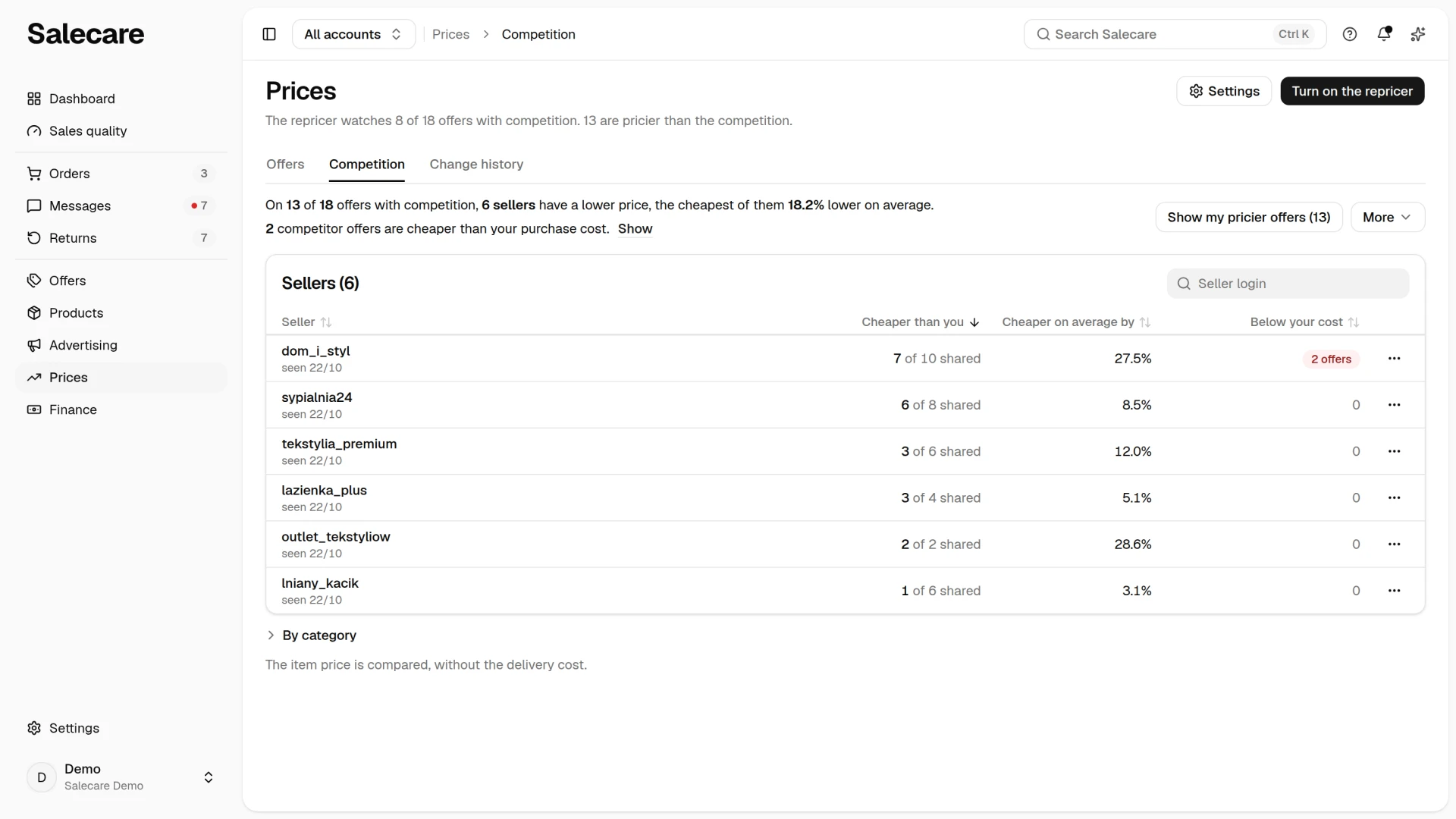
On the Prices page, on the Competition tab, two sentences say on how many offers with competition someone has a lower price and how many competitor offers are cheaper than your purchase cost. The Sellers table shows the Cheaper than you, Cheaper on average by and Below your cost columns for each seller, along with the date Salecare last saw their prices. A clicked row shows that seller's prices next to your offers, and the By category section tells you where the competition is cheaper most often. The tab compares the item price, without the delivery cost. The Competition tab is available from the Business plan.
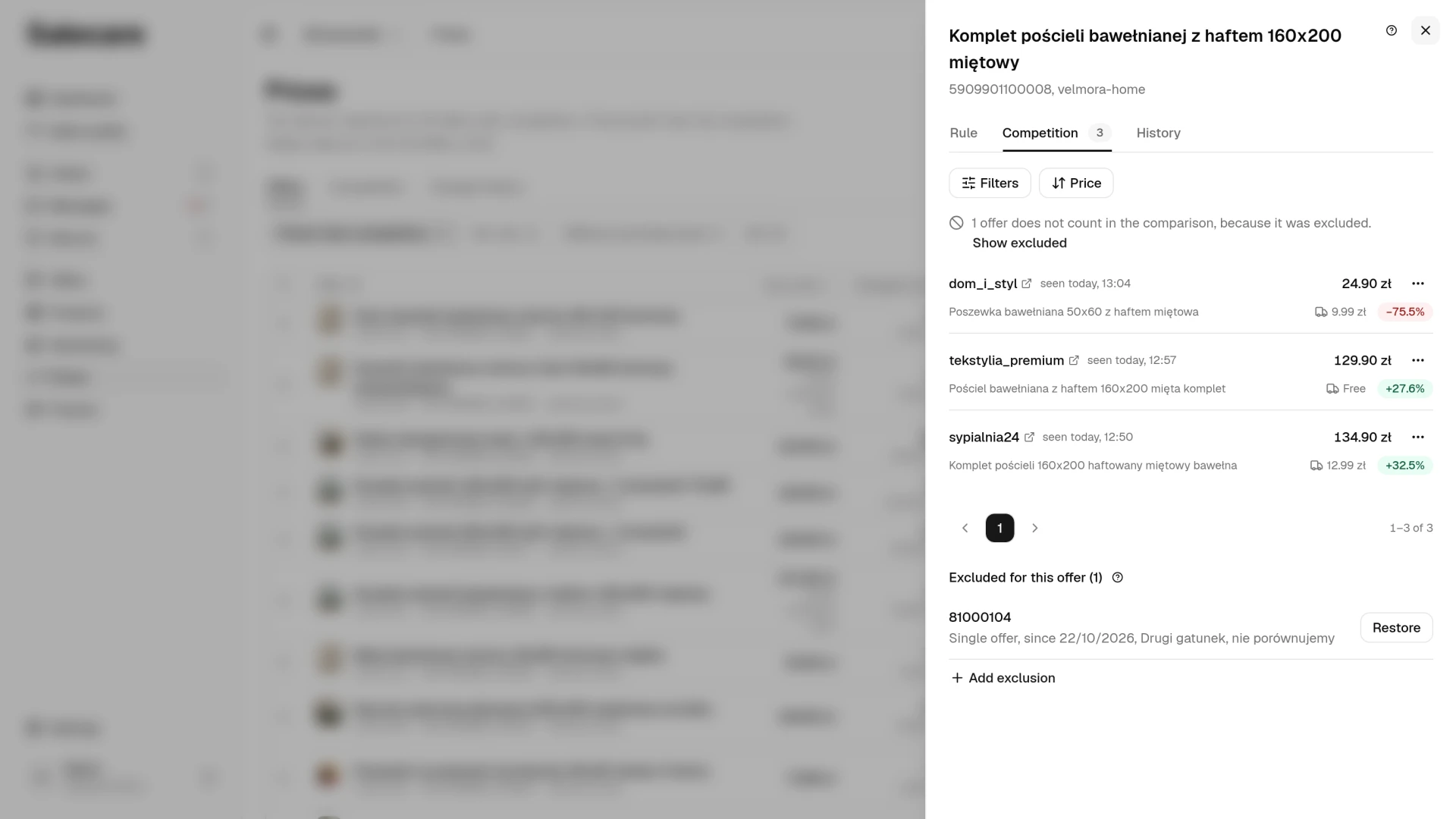
For a single offer, open the competitor list with Competitor prices in the menu of the offer's row, or on the Competition card of the offer panel. Each row has the seller's login, the price, the title of their offer, the delivery cost and the difference from your price. Opening the list orders a refresh of prices older than 30 minutes, and you see the new prices when you open the list again.
From the Business plan, once a day one notification gathers three situations. On offers without a repricer rule it reports a seller who appeared by your product in the last day with a lower price, and a competitor cheaper than you whose price is below your purchase price, for as long as that lasts. On every offer it reports a competitor who cut their price by at least 5% in the last day and is now cheaper than you. Under More on the Competition tab you download the PDF report or set the competitor report by email.
What do you do with what you see?
- A competitor drops below your purchase price. Following them means selling at a loss. Leave your price and check in the title of their offer that it really is the same goods.
- A competitor is cheaper, but within your margin. This is the repricer's job. It follows the cheapest competitor, but not below the minimum price worked out from your margin.
- The list holds an offer for other goods. Exclude it from the comparison in the menu of its row, in this offer only or in every offer. The lists and the Competition tab stop counting it straight away, and the repricer from the next price check.
- The purchase price is missing. Salecare shows who is cheaper and by how much, but cannot tell whether matching them pays. Fill in purchase prices with a file import or regularly from a wholesaler.
What next
- Everything the Competition tab shows is described on the page "Allegro competitor price monitoring".
- The minimum price and the repricer modes are described in the guide "Allegro repricer, automatic price changes that protect your margin".
- The commission that decides whether matching a price pays is described in the guide "Allegro commission in 2026".