Allegro Ads ROAS in 2026. How to work out margin after ads
ROAS, the return on ad spend, is sales divided by the cost of the ads. A ROAS of 4.0 means 4 zł of sales for every złoty spent on ads, and 1.0 means the ads cost as much as they sold. Salecare shows the ROAS from the Allegro Ads panel. The numerator is the sales Allegro credited to the ads, that is every purchase within 7 days of a click, including a purchase of another of your offers. The denominator is the cost of the clicks. Both amounts are gross, as in the panel's default view. That figure says nothing about profit, though, because of every złoty of sales only the margin is yours. So Salecare sets it against the margin and shows Margin after ads.
The Overview, Offers and Ad groups tabs are part of the Pro plan and up. On a lower plan those tabs carry a padlock with the plan name, and the Advertising entry in the menu lands on the Promotion tab, which works on every plan.
What ROAS is and why it says nothing about margin
The hard part is the numerator, that is deciding which sales may be credited to the ads. The Allegro Ads panel credits to the ads every purchase within 7 days of a click, and Salecare carries its amounts over unchanged. That is why ROAS in Salecare matches the panel to the grosz when the panel shows gross amounts.
No ROAS says whether the ads pay off. Of every złoty of sales only the margin is yours, and the ads have to fit in it. On a 40% margin ads pay back only from a ROAS of 2.5, on 25% from 4.0, and on 13% from 7.7. Salecare calls this threshold the break-even and shows it as pays from. It works it out as revenue divided by the margin before ads.
Margin after ads is the margin on the sales Allegro credited to the ads, minus what those ads cost. It can be negative. Ads with a ROAS of 5.0 on a 15% margin lose, and with a ROAS of 2.0 on a 60% margin earn. In Salecare Margin after ads is one of the four figures on the Overview tab and a column on the Offers and Ad groups tabs.
Step 1. Start with the Overview
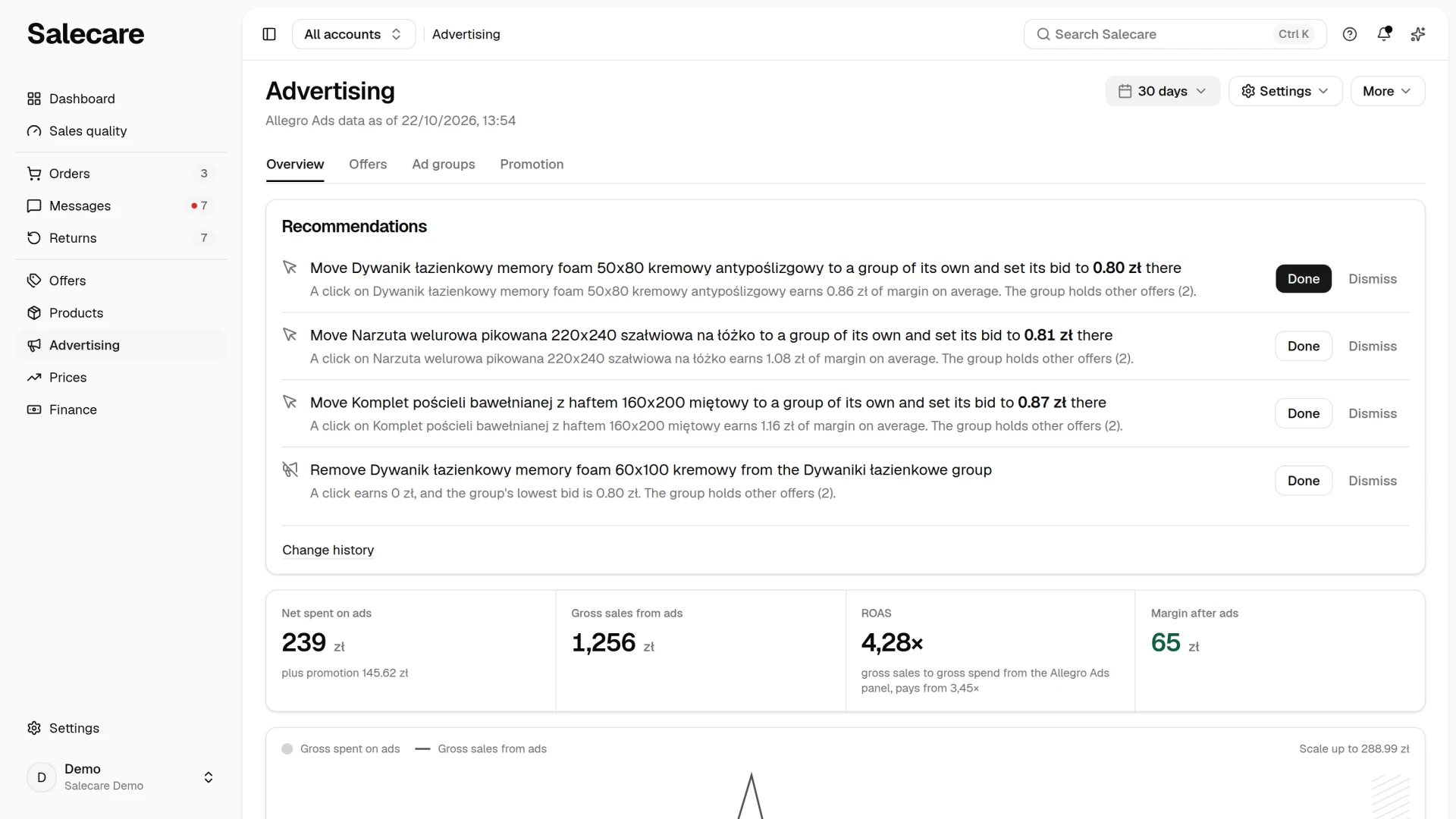
In the side menu click Advertising. At the top of the Overview tab sits the Recommendations card, described in the guide "How to set up ad recommendations and break-even ROAS". Under it are the four figures of the period.
- Net spent on ads or Gross spent on ads is the Allegro Ads cost from the Allegro settlements. The name says whether the amount is net or gross, by the The company is registered for VAT field in the VAT settings. Under the amount sits a plus promotion note with the amount of promotion fees.
- Gross sales from ads is the sales Allegro credited to the ads in the days of the chosen period.
- ROAS is those sales divided by the ad cost the Allegro Ads panel charged, both amounts gross. The note under the number says so, "gross sales to gross spend from the Allegro Ads panel", and after it comes pays from with the break-even. That is why, for a company registered for VAT, ROAS does not come from dividing the sales by the net amount beside it.
- Margin after ads is the margin on the sales credited to the ads minus the Allegro Ads cost, added up over the advertised offers that have panel data. It is green from zero up and red below zero.
The Spent on ads figure on the Overview tab is the Allegro Ads cost from the Allegro settlements, the same as on the Profit & loss statement page. The Net spent or Gross spent column on the Offers tab is the spend of each offer as read from the Allegro Ads panel, without VAT for a company registered for VAT. The sum of that column can therefore differ from the Overview figure by the fees Allegro settles later.
You choose the period with the button in the top right corner. The choice applies to the Overview and Offers tabs and stays when you move between them. Under the title sits a line "Allegro Ads data as of" with the time of the last panel read. In the all-accounts view it gives the time of the oldest of the connected accounts' latest reads, so you can see that the panel of some account has not been read for a long time. A disconnected account is no longer read, so its old read does not pull that date back. The Promotion tab counts fees from the Allegro settlements, so its line reads "Allegro data as of" with the time the settlements were last downloaded. When the read is older than 48 hours, a message with the number of days and an Open the Allegro Ads panel button sits above the tabs. Below, the Ad spend and sales from ads day by day chart shows how much the ads cost each day and how much in sales Allegro credited to them. The day's amounts are the whole account's sum from the Allegro Ads panel chart, so they include offers that Salecare has not yet fetched from Allegro. That is why the legend calls the spend Gross spent on ads, also for a company registered for VAT. ROAS is worked out from the same amounts. A day the panel has not sent yet is not a day without sales. It has no bar, the sales line ends on the last day sent, and the days without data are hatched. A sentence under the chart then says so, for example "Allegro Ads sent data up to 12/10. Days without data are hatched.". Allegro does not give hourly ad data, so the Overview tab does not split a day into hours. When the panel sent nothing from the chosen period, the chart says "Allegro Ads sent no data for this period.", and Gross sales from ads, ROAS and Margin after ads show a dash.
The threshold under ROAS on the Overview tab is worked out from the margin of the selected period. The one in Recommendation settings and in a recommendation's reason comes from the 30 days ending 7 days ago, the days the ads are judged on. That is why the figures can differ. A third threshold sits in the offer panel, in the Pays from row. It is worked out from the margin of that one offer in the selected period, so two offers of the same account have two different thresholds.
When an offer sells without a purchase price, its margin after ads rests on the estimated cost of goods and carries a ~. The number on the Overview tab then gets a ~ too, with a note about the estimated cost of goods and an Add purchase prices link under it. If the company is registered for VAT and even one order of the period has no VAT rate, Margin after ads shows a dash, and under the figures sits the sentence "Some orders in this period have no VAT rate, so the net margin after ads cannot be stated.". Where the missing rate comes from and how to fill it in is described in the guide on VAT and rates.
Step 2. Find the offers burning budget
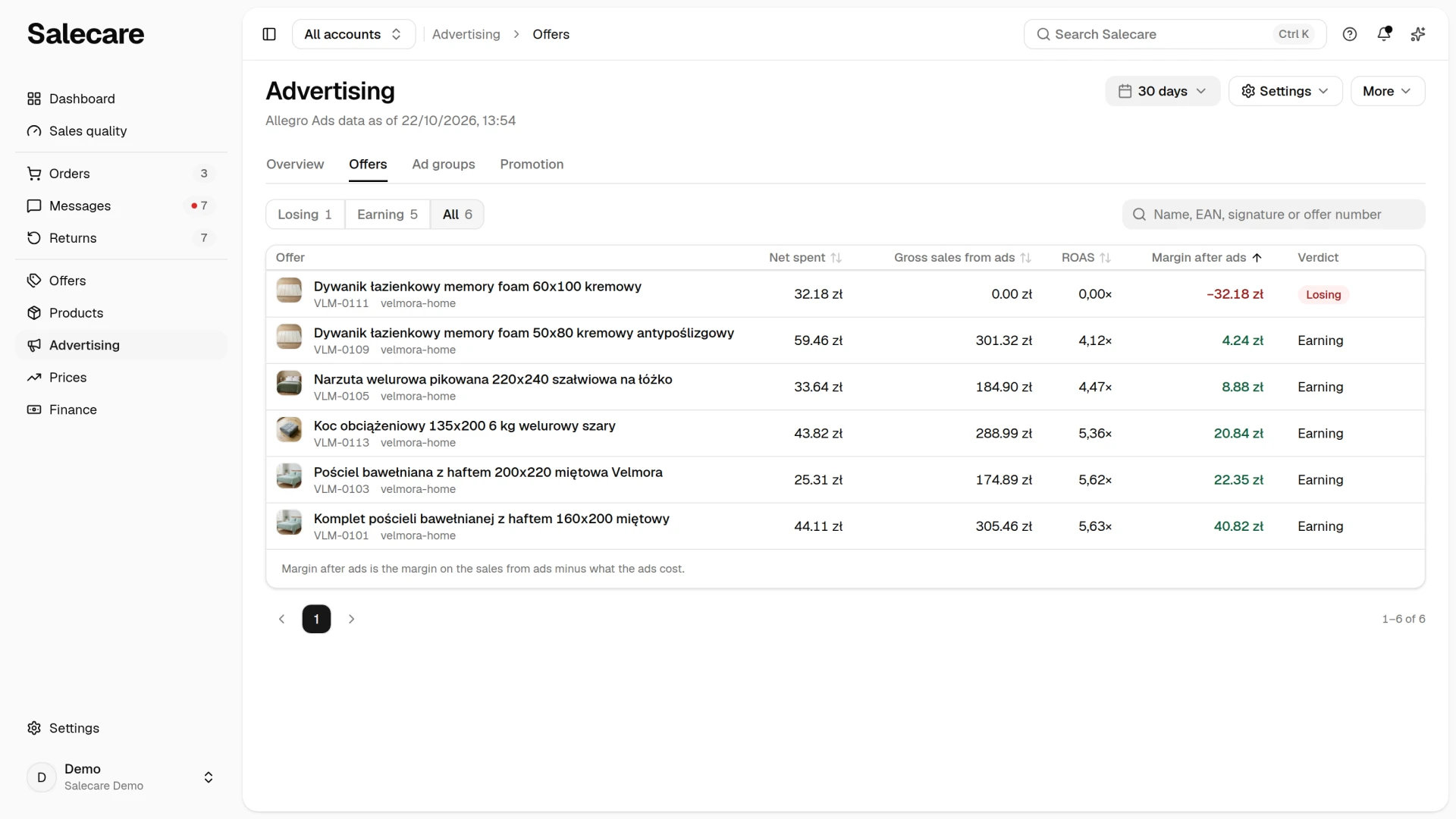
Click the Offers tab. The table has six columns, that is Offer, Net spent (Gross spent for a company that does not settle VAT), Gross sales from ads, ROAS, Margin after ads and Verdict. Clicking an offer opens a panel with all its Allegro Ads figures. The rows are offers for which the Allegro Ads panel gave spend or sales from ads in the period, plus offers from an active ad group for which the panel gave nothing. The latter have "No Ads data" in the Verdict column.
The Verdict column says whether the offer's ads paid back in margin. "Losing" means Margin after ads is negative. "Earning" means the ads cost something and the margin on the sales from ads covers that cost. An offer whose margin after ads cannot be worked out has a dash in the column. Above the table the Ad verdict filter keeps the offers that are "Losing", "Earning" or have "No Ads data", and "All" brings the whole list back. Beside it is a search by name, SKU, EAN and offer number. The headers of the spend column, Gross sales from ads, ROAS and Margin after ads sort the table. On a phone the offers are rows of one card with the verdict and the four labelled amounts, and a tap on a row opens the same panel. You pick the order in the menu above the card. It holds every field the table headers sort by, and the menu button names the field the list is ordered by. Picking the same field again reverses the order. Sort it by the Margin after ads column ascending and look through the top of the list. An offer with a few dozen złoty of spend and a negative margin after ads is the first candidate to pause. When an offer is in several of your ad groups, a warning mark sits beside its spend, and the tooltip says how many groups advertise it. Such groups can push up each other's cost per click.
The offer panel gathers in one place the rows Spent on ads, Promotion fee, Gross sales from ads, Units from ads, ROAS, Pays from, Impressions, Clicks, Average cost per click, the offer's revenue and margin, and Margin after ads. Under them are the ad groups that advertise the offer and a recommendation for that offer with a See the recommendation link, if one is waiting. If the Allegro Ads panel gave neither spend nor sales from ads for the offer, the offer panel says so plainly.
The offer panel says in the names of its rows whether the amounts are net or gross. The rows are called Net revenue or Gross revenue and Net margin or Gross margin. The offer's spend and Margin after ads are net or gross by the same field, The company is registered for VAT in the VAT settings, and the header of the spend column says so plainly, Net spent or Gross spent. A company registered for VAT sees them net, and a company that does not settle VAT, gross. Gross sales from ads and ROAS are always gross, as in the Allegro Ads panel, whether or not the company is registered for VAT. The Allegro Ads panel can be switched to net amounts. It then shows the cost, CPC and budgets 1.23 times lower, and a ROAS 1.23 times higher than Salecare, because the sales value stays gross in it. Before you compare with Salecare, switch the panel back to gross amounts.
Data from the panel reaches an offer by its number, so two offers with the same title have separate spend and clicks. Salecare matches data by title only when the panel gave no number and only one offer of the account has that title. An offer that Salecare has not yet fetched from Allegro counts towards the account total on the Overview tab, but it is not in the table. Under the table sits a sentence saying that Margin after ads is the margin on the sales from ads minus the spend on those ads.
The Ad groups tab shows the same for groups. The figures cover the last 30 full days, up to yesterday. Salecare reads them anew at every sync, and they do not depend on the selected period. The table has the columns Ad group, Daily budget, Bid, ROAS and Margin after ads. Under the daily budget sits how much of it the Allegro Ads panel has spent, for example "80% spent". When the panel gave no budget for the group, just the amount sits there. The Bid column gives the bid strategy and its value. A group's Margin after ads is the margin on the sales Allegro credited to the group's ads, minus the group's click cost. The Allegro Ads panel does not know your margin, and a group advertises many offers, so the margin is worked out at the account's margin before ads, the same one the break-even comes from. It is worked out from the gross amounts from the panel, even for a company registered for VAT. For such a company it can therefore be higher than Margin after ads of the same offers on the Offers tab, where the amounts are net. For example, an account has a 20% margin before ads, so its break-even is 5.00. A group sold 150 zł at a cost of 20 zł, so its Margin after ads is 150 zł × 20% − 20 zł = 10 zł. A dash means the panel did not send the group's cost or sales value, or the account has no margin yet. The "Losing" filter keeps groups with a negative margin after ads, "Earning" those with a positive one, and a group without that figure appears only under "All". Clicking a group opens a panel with its status, delivery, bid strategy, placements and offers, and the See the recommendation link leads to the group's recommendation on the Overview tab. The list starts with the largest loss, and the Margin after ads header reverses the order. On a phone the groups are rows of one card with the four labelled values, a tap on a row opens the same panel, and you reverse the order in the menu above the card.
Step 3. Look in on the Change history
The Change history panel opens with the Change history item under the More button in the top right corner of the Advertising page, or with the Change history link under the Recommendations card. The panel has two lists, Changes and Checks.
The Changes list shows the changes passed to the Salecare Ads extension, each in one sentence, for example "Bid in the" group with "from" and "to" amounts, with the account and the person who approved it, and a status. An entry appears when a recommendation is passed to the extension. There are two ways, and they do not work the same.
- On the Overview tab the Apply button only adds the change to a queue. It reaches Allegro Ads only when you open that account's Allegro Ads panel and, in the extension's side panel, in the Changes to make section, click Apply. Until then the change has the status "Pending" or "Delivered" in Change history, and the ads run as before.
- In the extension's side panel, on the Allegro Ads card, the Apply button beside a recommendation makes the change at once.
A change that is waiting does not vanish when you close the browser tab with the panel. If the extension received it but did not make it, it returns to the Changes to make section when you open that account's Allegro Ads panel again after at least 10 minutes. You withdraw a change with the status "Pending" or "Delivered" with the Cancel button by its status. The extension then will not make it, and the recommendation returns to the Recommendations card, so you can apply it again or dismiss it. Salecare withdraws a change by itself when you dismiss its recommendation or click Done, when the recommendation's condition disappears, and when the change waits longer than 3 days, because its amounts may be out of date. A withdrawn change has the status "Cancelled". If the extension makes it anyway, for example when an older version of it runs in a browser tab open for a long time, the status changes to "Applied", because the change did get into the panel.
The extension's side panel does not show the whole list from the Overview tab. It shows up to 20 recommendations of the account open in the panel that wait for your decision and that the extension can make. It does not have pauses that still wait 3 days for confirmation, nor recommendations that already wait in the Changes to make section. So an empty side panel does not mean there is nothing to do. Changes made by hand, and changes made in the Allegro Ads panel bypassing Salecare, do not appear on the Changes list, because that list shows only changes passed to the extension.
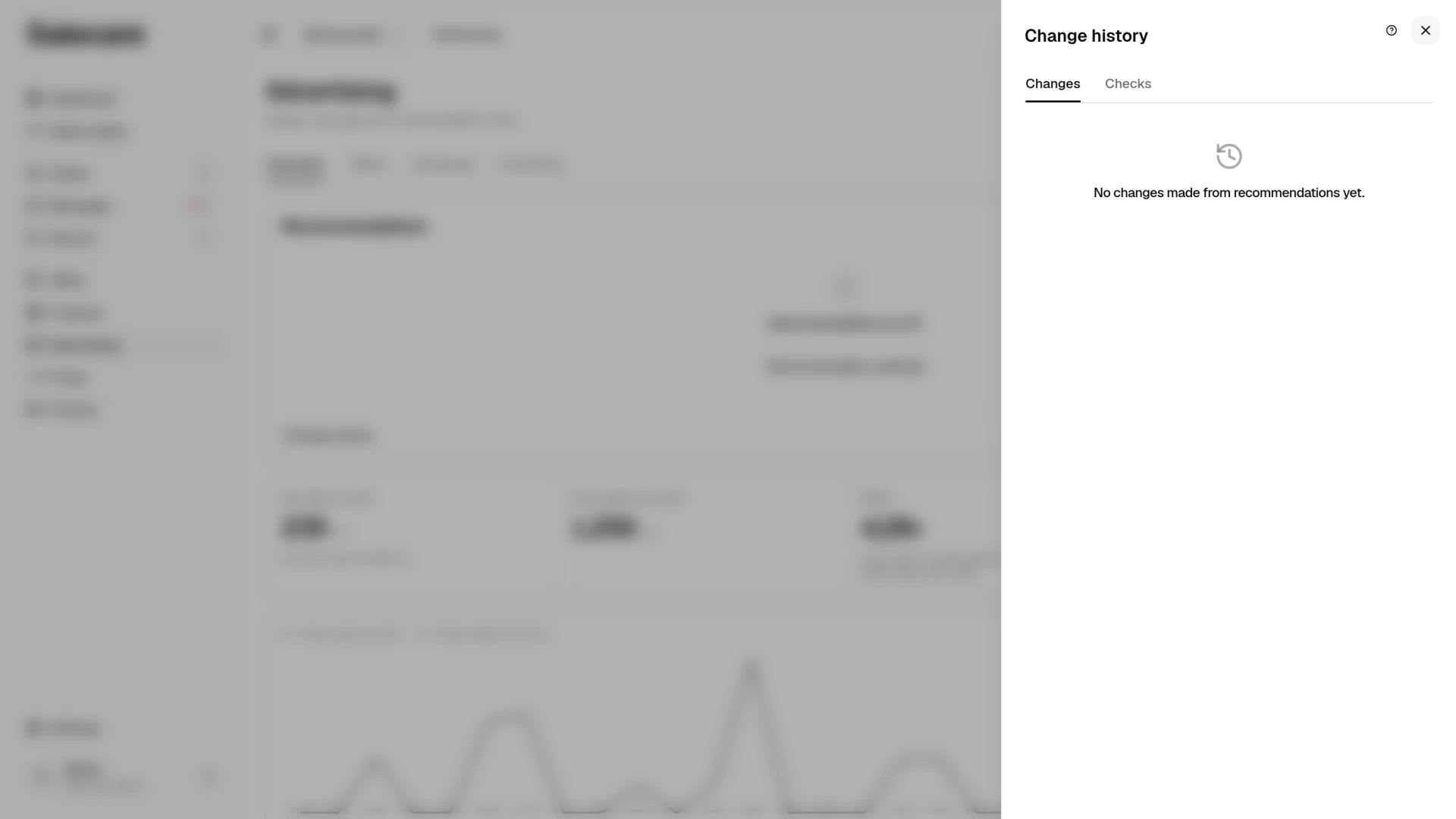
Under the Changes list the What the changes did section shows what each change made from a recommendation did, including ones marked with the Done button. A row compares the ROAS from the Allegro Ads panel for the full days just before the change and just after it, over the same number of days on each side, at most 7, for example "ROAS 2.10 before, 3.05 after, 7 days each". The day of the change is not counted, because it mixes the old and new bid. A change of bid, budget or a pause of a group is counted for all offers of that ad group, also when the recommendation came from the figures of one offer, because the whole group has those settings. A recommendation you carry out by moving one offer out of a group with other offers is counted for that offer. A recommendation with no group named is counted for the offer or for the whole account. The comparison ends on the last day the extension sent from the panel, so a missing sync shortens it instead of showing zero spend. While a row carries the "Preliminary" badge, sales after the change can still grow, because Allegro credits a purchase to a click for 7 days. When too few days have passed, the row says "Too early to tell.". The section covers the 20 newest changes of the last 60 days. When Salecare has no change yet, the list says "No changes made from recommendations yet.".
The Checks list shows the checks in which Salecare really judged the account. Each has a date, ROAS from the panel with pays from and the break-even, the account login and the result, that is the number of recommendations or the reason why there is none, for example "No Allegro Ads data", "ROAS within the corridor, no change" or "Spend below 10 zł". The hourly check before the time set in Recommendation settings leaves no entry.
Ad groups that a Salecare delivery schedule, now retired, once paused and that are still paused are handled by the extension at the nearest opening of that account's Allegro Ads panel. If the pause lasts less than a day, the extension resumes the groups by itself. An older pause the extension shows in the Changes to make section, because you may have left it on purpose. Apply resumes those groups, and Skip leaves them paused.
How Salecare computes ROAS and margin after ads
Margin before ads is the margin on sales after the cost of goods and shipping, commissions and other Allegro fees, but before the ad cost. On the Ad groups tab the daily budgets, spent budget and bids stay as they are in the Allegro Ads panel, also when the app shows net amounts. A group's Margin after ads is worked out from the same gross amounts.
An offer's Margin after ads is the offer's margin before ads multiplied by the share of the sales credited to the ads in its revenue, minus the Allegro Ads spend. So it counts only the part of the margin the ads could have bought, not sales that came without them. The promotion fee does not enter this figure, because it buys no clicks. When the panel sent no data for the offer, a dash stands in the column.
Ad cost inside the margin
The Salecare Ads extension reads from the open Allegro Ads panel the daily spend of each advertised offer together with impressions and clicks. An offer's spend on the order's day is split equally between that offer's orders of that day, without cancelled ones, and each part is taken off the order's margin the same way as the promotion fee. Allegro gives no spend for a single order, so the order card marks this amount as an estimate. The full cost of ads for a period is shown by the profit and loss statement.
For a company registered for VAT, an offer with even one sale that has no VAT rate in the chosen period has no net revenue or margin. A dash then sits in place of Margin after ads. Units sold and spend are known and stay in the offer panel. A filter on such a column skips the offer, and sorting puts it last instead of counting it as zero.
Recommendations
Accounts are judged once an hour, but recommendations are worked out no more often than the Work out every (hours) field says, every 24 hours by default. Salecare looks at the 30 days that end 7 days before today, because Allegro credits purchases up to 7 days after a click and the ROAS of the freshest days is still rising. With spend below 10 zł a check ends with no recommendation, and the reason sits on the Checks list in Change history.
Salecare compares the ROAS from the Allegro Ads panel with two limits. Below the lowest ROAS it advises "Lower the bid", above the highest "Raise the bid", and in between there is no change. With "Automatic" the lower limit is the account's break-even from its margin before ads. When the Highest ROAS field is empty, Salecare does not advise raising the bid. A bid raise is always one step, at most 10%, 20% or 25% depending on the pace of raises. When a group has at least 30 clicks and a known margin on sales from ads, the raise will not exceed three quarters of what the ads of the group's offers earned per click. With fewer clicks it is one step from the current bid, without that limit. There is no raise for a group that the same check advises lowering or in which it advises pausing an offer, nor for a group with an offer advertised by several of your groups, until you dismiss the recommendation for that offer. Allegro gives no hourly ad data, so Salecare judges whole days and does not advise changes for single hours.
The "Turn off the ad of" recommendation for an offer appears in four situations.
- At least 30 clicks, not a single order, and spend worth at least three sales of that offer, that is three times the margin that one piece at the offer's price gives at the account's margin, and when that margin cannot be worked out, the whole offer price. Never less than 10 zł.
- The margin on sales Allegro credited to the ads, per click, is lower than the ad group's minimum bid, so no allowed bid will pay back. It needs at least 10 zł of spend and 30 clicks or 3 pieces sold from ads.
- A negative margin before ads, with at least 10 zł of spend. An offer whose whole spend is a promotion fee, with no Allegro Ads cost, gets a "Check the price" recommendation instead. There is nothing to pause in the Allegro Ads panel then, so the recommendation advises not extending the highlight and checking the offer's price and costs. The Open in Prices button leads to that offer.
- A ROAS from the Allegro Ads panel below the offer's break-even, with at least 10 zł of spend and 30 clicks or 3 pieces sold from ads. A custom lowest ROAS replaces the break-even from the margin. When the ads sold nothing, the ROAS is 0 and the offer waits for the same spend as in point 1.
Allegro Ads pauses a whole ad group, not a single offer. When that offer's group has other offers too, the recommendation says how many, and advises removing this offer from the group in the Allegro Ads panel, because pausing the group would stop all its offers. Such a recommendation has a Done button instead of Apply, and it is not on the list in the extension's side panel.
"Lower the bid" also appears for a single offer when the group's maximum bid exceeds three quarters of the margin the offer's ads earned per click. The recommendation advises lowering the maximum bid to three quarters of that margin, that is with a quarter to spare, but never below the group's minimum. When the margin per click is not lower than the group's minimum, but three quarters of it is, the recommendation advises going down to the minimum instead of pausing the offer. Allegro often charges less per click than the maximum bid, so this advice does not mean the group loses on every click. The bid applies to all offers in the group, so when there are other offers in it, the recommendation says how many and advises moving this offer to a group of its own. You make that change yourself in the Allegro Ads panel and click Done.
A group with Dynamic CPC has a target average cost per click in the panel instead of a maximum bid, so the recommendation says which target average bid to change it to. Allegro will not accept a target average bid lower than 1.25 times the highest minimum bid of the categories in that group, so the recommendation never goes below that amount. You make such a change yourself in the Allegro Ads panel, because the extension does not write the target average bid. A group in which only Allegro sets the bids gets no advice on bids.
When judging an offer, Salecare takes the lowest cost per click the offer's ad group can have. If the extension pulled the group's minimum bid from the panel, Salecare works on it. If not, it takes the highest of the minimums Allegro publishes for the categories advertised in that group, in search results. In other placements Allegro sometimes allows a lower minimum, for example in the Home and Garden category 0.65 zł instead of 0.75 zł. Before you pause an offer, check the group's minimum bid in the Allegro Ads panel, because the table of minimums Allegro publishes may be older than your panel.
The "Raise the budget" recommendation advises raising by 20% the daily budget of a group that used up its budget in the panel, when its offer has a ROAS from the Allegro Ads panel at the break-even or higher and a positive margin. The new budget is never below 3 zł a day. A used up budget is one the panel marked as used, or one from which the group spent at least 90% by the last sync. A group with budget left does not get this advice, because it would not spend the higher limit anyway. Salecare proposes at most 5 budget raises in one check, starting with the offers with the highest ROAS, and none for an offer advertised by several of your groups or for a group changed in the last 7 days.
"Keep the offer in one ad group" says that more than one of your groups advertises the same offer, and those groups' spend on it in the last 30 days was at least 10 zł. Such groups can bid against each other and push up the cost per click. So as long as the offer is in several groups of that account and you do not dismiss the recommendation, Salecare does not advise raising the bid or budget of that offer, nor the bid of any group that advertises it. Sometimes several groups are on purpose, for example after rebuilding groups following a change in Allegro's minimum bids. In that case dismiss this recommendation. It does not come back at later runs, and bid and budget raises for that offer appear again. "Split the group by offer margin" says that in a group with at least 3 offers the break-evens differ at least twofold.
Every recommendation is advisory. An indicator-based pause can be applied only after 3 days, if the condition holds, and a recommendation whose condition disappeared leaves the card by itself, also one passed to the extension. A change from it that waits in the Changes to make section is then cancelled. A recommendation that is already closed, that is dismissed, done or one whose condition disappeared, cannot be applied on the Overview tab or in the extension's side panel, even if it had been open from earlier. The extension makes the approved bid or budget only when they still match those in the panel. It refuses when a raise would no longer raise the bid or budget, when a lowering would no longer lower the bid, or when a raise would come out more than 25% above the current bid or more than 20% above the current daily budget, for example after a manual change in the panel. Wait then until Salecare works the recommendation out again and apply it again. After a change in an ad group, the next advice for that group waits 7 days, so the effect is visible.
Example. A similar ROAS and the opposite margin after ads
All the figures are made up. A shop spends 780 zł on each of two offers over 30 days. A desk lamp at 149 zł has a 22% margin before ads. Allegro credited 3,100 zł of sales to its ads, so the ROAS is 3.97, and the margin on those sales is 22% of 3,100 zł, that is 682 zł. Margin after ads is 682 zł minus 780 zł, that is a loss of 98 zł. The break-even is 100 divided by 22, that is 4.55, and the ROAS of 3.97 does not reach it. The offer has "Losing" in the Verdict column. With 30 clicks or 3 pieces sold from ads, Salecare prepares "Turn off the ad of" the offer, to apply after 3 days if the result does not improve.
A desk organiser at 59 zł has a 40% margin before ads. Allegro credited 2,950 zł of sales to its ads, so the ROAS is 3.78, lower than for the lamp. The margin on those sales is 40% of 2,950 zł, that is 1,180 zł, and Margin after ads is 1,180 zł minus 780 zł, that is a profit of 400 zł. The break-even is 2.50, and the offer has "Earning" in the Verdict column. The spend is the same and the ROAS almost the same, yet the result is the opposite, because the difference is made by the margin, which the panel does not know. Read the table from the Margin after ads column, and treat ROAS as an explanation, not a verdict.
Margin after ads counts only the sales credited to the ads. Here is an example for a seller who does not settle VAT. An offer has 1,000 zł of sales and 300 zł of margin before ads, and Allegro credited 400 zł of those sales to the ads at an Allegro Ads cost of 100 zł. The margin on those sales is 30% of 400 zł, that is 120 zł, and Margin after ads is 120 zł minus 100 zł, that is 20 zł. The other 600 zł of sales came without ads, so its margin does not improve the result of the ads. The promotion fee does not enter this figure, because it buys no clicks. When the Allegro Ads panel sent no data for the offer, a dash stands there.
Common mistakes
- Do not compare ROAS with a number from a blog. A custom lowest ROAS typed lower than the account's break-even lets through offers that lose. So leave "Automatic" or check the break-even in Recommendation settings.
- Do not judge ads by the freshest days. Allegro credits purchases up to 7 days after a click, so today always looks worse than it will in a week.
- Do not pause ads after one bad week. A ROAS from a few clicks says little, so Salecare waits for 30 clicks or 3 pieces sold from ads and for the condition to hold for 3 days.
- Do not try to rescue an offer with a negative margin with ads. When an offer loses on every piece, no ROAS will save it, and a higher budget enlarges the loss.
- Do not add up columns from different sources. The Spent on ads figure on the Overview tab comes from the Allegro settlements, and the spend column on the Offers tab from the Allegro Ads panel, so their sums can differ. Do not divide the sales from ads by the net spend either, because ROAS takes the gross spend.
Questions about ROAS and Allegro Ads
What is a good ROAS in Allegro Ads?
One that exceeds the break-even from the margin, 2.5 on a 40% margin, 4.0 on 25%, 7.7 on 13%. Compare an offer with its own break-even, which Salecare works out from its margin and gives in the Pays from row of the offer panel, not with a universal number.
Why does ROAS in Salecare differ from ROAS in the Allegro Ads panel?
When the panel shows gross amounts, it does not, because Salecare divides the same sales credited to the ads by the same click cost. If you have the Allegro Ads panel switched to net amounts, it shows a ROAS 1.23 times higher than Salecare, because the sales value stays gross in it. Switch it to gross.
Does Salecare change campaigns automatically?
No. Recommendations are advisory only. You pass a bid, a daily budget or a pause of an offer to the extension yourself, with the Apply button on the Overview tab or the Apply button beside a recommendation in the extension's side panel. The extension makes a change from the Overview tab only after you click Apply in the Changes to make section, with that account's Allegro Ads panel open. Every change passed to the extension lands on the Changes list in Change history. A recommendation the extension does not make you carry out yourself in the Allegro Ads panel and mark with the Done button.
What do I do when a change stays "Delivered" in Change history for a long time?
The status "Delivered" means the extension received the change but has not made it yet. Open that account's Allegro Ads panel and click Apply in the Changes to make section of the extension's side panel. If the browser tab with the panel was closed earlier, the change returns to that section after 10 minutes. If you no longer want the change, click Cancel by its status. A change that nobody made within 3 days is cancelled by itself.
Where does Salecare get the ad cost when Allegro offers sellers no Allegro Ads statistics API?
Allegro offers the Allegro Ads statistics API only to companies in the Allegro Ads Partner programme, not to ordinary sellers or applications outside it. Salecare takes promotion fees from the Allegro settlements on every plan. The daily campaign cost of a single offer, with impressions and clicks, is read by the free Chrome extension Salecare Ads from the panel open in your signed-in session.
Why does a pause recommendation wait for confirmation?
Because it turns off the offer's ad, and what it rests on can still change. ROAS and the profitable bid move with one good or bad week, and Allegro credits a purchase to the ads up to 7 days after a click, so clicks with no order can still be undone by a late purchase. That is why every offer pause, also one for clicks with no order, can be applied only once the condition has held for 3 days. Until then the row shows "You can apply it from" with a date.
Is Margin after ads net or gross?
It depends on the The company is registered for VAT field in the VAT settings, the same as the offer's revenue and margin and the spend, which the header calls Net spent or Gross spent. The amounts from the Allegro panel, that is Gross sales from ads and the ad cost from which ROAS is worked out, are always gross, as in the panel's default view. A group's Margin after ads is worked out from gross amounts. If you switched the Allegro Ads panel to net amounts, the cost, CPC and budgets in it are 1.23 times lower than in Salecare, so to compare, switch it back to gross.
What next
Turn the conclusions of your analysis into settings. The guide "How to set up ad recommendations and break-even ROAS" shows how to set the ROAS limits and the bid raise pace. You will see the effect of ads on the whole company's result in the guide "How to read Finance, the profit and loss statement".