How to improve your sales quality measures
Since 26 August 2026 Allegro judges sellers on 7 measures, 400 points at most in all. Each of those measures has its own points cap, which Salecare shows beside the score. Three of them depend on how you serve buyers. Timely responses counts the replies given in time. Unresolved buyer issues counts the compensations paid from Allegro Buyer Protection. Claim resolution time gives the full points when you decide on a claim in under 7 days on average. You often learn that a measure is falling only once the badge has already gone. Salecare shows the same measures Allegro judges you by, as they stand, without logging in to each account separately.
Step 1. Open Sales quality
In the side menu go to Sales quality. The page has two tabs, Score and Ratings. Score shows how Allegro rates your sales, and Ratings collects the ratings left by buyers. The number beside the Ratings tab is the negative ratings you have not replied to. It is the same number as on the "To answer" view of that tab. The old addresses of the Account health and Account risk pages open the Score tab. Under the title stands the day and time the Allegro data comes from. The Open in Allegro button leads to the same view in the Allegro panel. The help icon "?" beside the Allegro measures and Score history cards opens the Help panel with this guide, on the description of that card, so you do not have to hunt for definitions in the terms.
Allegro scores each account on its own, and the points of different accounts cannot be added up. With several accounts, pick one in the account switcher in the top bar. With "All accounts" picked, the Score tab lists the accounts in the Allegro accounts table with the score, level, change and badge of each. A click on a row or on the arrow at its end opens the score of that account. The account switcher stays on "All accounts" meanwhile, so the other pages still show every account. The path in the top bar then ends with the account login, its name stands above the page title, and the All accounts button takes you back to the table. The Ratings tab then shows the ratings of that account, and when ratings without a reply wait, it opens on the "To answer" view. Before you connect an Allegro account the page says sales quality appears once you connect one, and the score fills in after the first download of data from Allegro. When the Allegro connection does not include sales quality, a message above the figures says Salecare does not fetch new days, and the days stored earlier still show.
Step 2. Start with the score and the measures
The Score tab opens with three figures. Sales quality score is the score of the picked account with the level Allegro gave it, from "Super" to "Needs improvement". Change in 30 days says how many points the score moved between the oldest and the newest of the last days Allegro graded. The line under that figure draws the score of those days. Super Seller gives the date until which the days at the "Super" level suffice, or how many of the three badge conditions are met. The badge beside it says whether the badge is safe, has a few days left, or a condition is already not met. When Allegro sends a level Salecare does not know yet and the score is below 0, Salecare shows "Needs improvement", because that is what Allegro calls any score below 0.
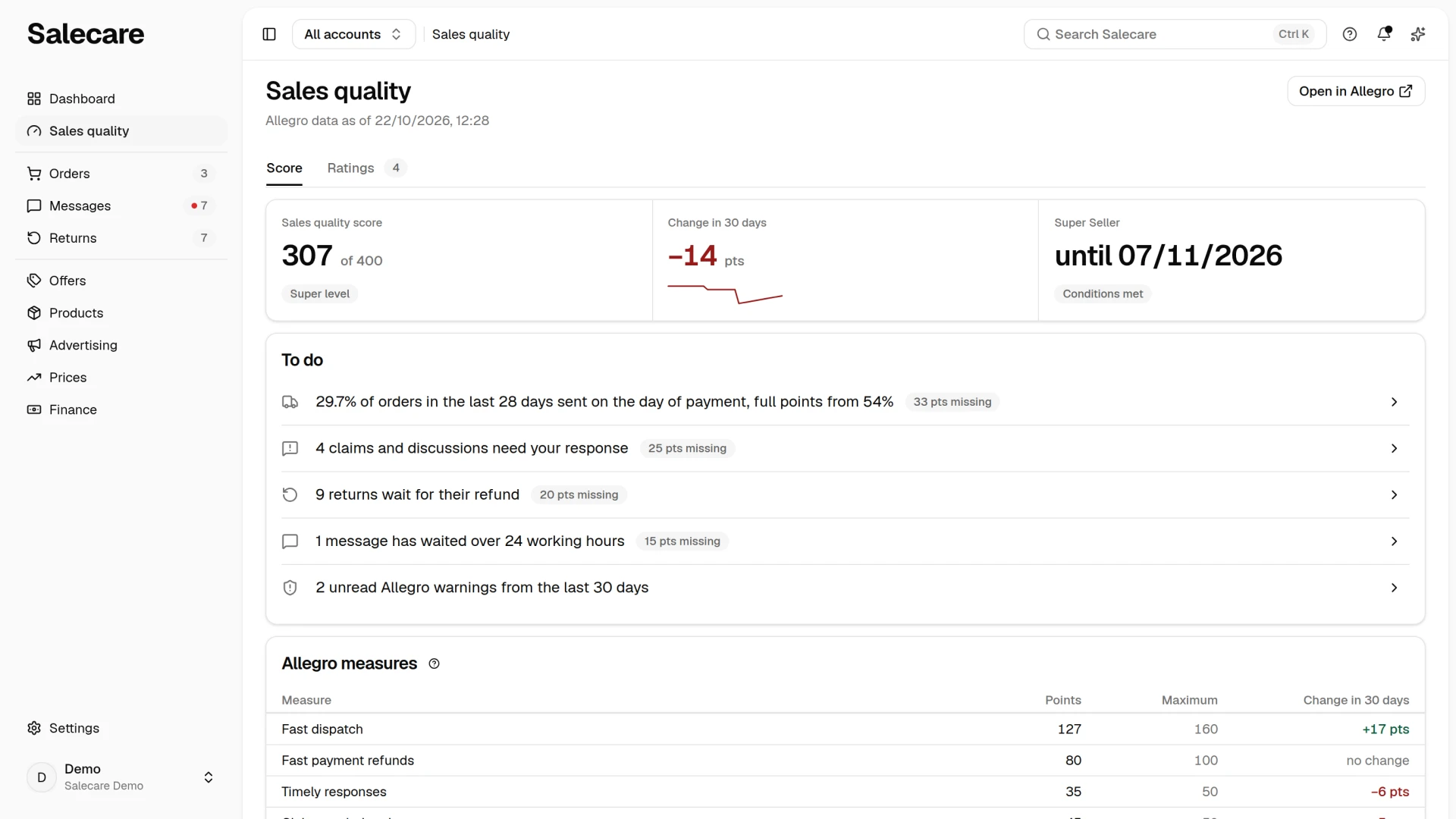
To do
Under the figures stands the To do section. It lists the work that wins back points in the measures that lost points on the last day Allegro graded. A row appears only when a measure loses points, something waits for your reaction, and you may open the list the row leads to. The row missing the most points stands on top, with a "40 pts missing" badge, and Allegro warnings always come last. The whole row is a link to the list it took its number from. The number in a row is the number of items on that list, counted by the same criterion. For an account opened from the Allegro accounts table the lists open for all accounts, so the rows count the matters of all accounts. The exception is the ratings row, which counts the ratings of that account and opens them with the Account criterion. When nothing waits, the section says "Nothing urgent today".
- The row about orders sent on the day of payment gives no count. It gives the share of such orders over the last 28 days against the share Allegro gives full points from, and leads to the orders to dispatch.
- The row about late dispatches counts the dispatches past their time in the last 28 days and leads to the orders with that criterion.
- The row about claims and discussions counts the cases that need your response. It opens the "All" view on the Messages page with the criterion set to "Needs your action". Cases hidden in Salecare are not counted.
- The row about returns counts the returns that still wait for the refund to the buyer. It opens the Returns page with the Decision criterion set to "Waiting for the refund".
- The row about messages counts the threads whose answer has waited over 24 working hours. These are buyer messages, messages in claims and discussions, and buyer e-mails. E-mails belong to the whole company, so they count whatever account is picked. They are the same threads as the "Overdue" group of the "To answer" view, which this row opens. A thread hidden in Salecare is not in the number, but Allegro still sees it unanswered, so you close a buyer's message with a reply and not by hiding it.
- The row about ratings counts the negative ratings that can still be reported for removal and opens the "To report" view of the Ratings tab. Since 26 August 2026 ratings are not a sales quality measure. The row therefore appears only when the last day Allegro graded still holds such a measure.
- The row about warnings counts the unread Allegro warnings from the last 30 days and opens the "From Allegro" view with those warnings only. It carries a points badge only when Allegro takes points for breaking its terms.
Allegro measures
The Allegro measures card lists every measure of the last day Allegro graded, starting with the one with the highest maximum. It ends with a Total row with the score of the whole account. Each measure has the Points and Maximum columns and the change over 30 days. You therefore see at once how many points you lose and which measure is falling and which is rising. A measure that has no second day to compare with shows a minus in the change column, and a measure that did not move says "no change". Allegro can also take points off, for example for Timely responses under 95%, and then the measure has a negative score. The Unresolved buyer issues and Terms & conditions and rules measures only take points off, so they show the score alone with its minus, without a maximum. With no violations Terms & conditions and rules takes off nothing. In Unresolved buyer issues an open discussion alone does not lower the score, because Allegro counts the compensations paid. Timely responses can take up to 285 points, because under 95% of replies in time Allegro takes off 3 points for every 1%. You have 24 hours to reply, and Allegro does not count Saturdays, Sundays and statutory days off. Claim resolution time is the average of the claims filed in the last 30 days. An average under 7 days gives the full 50 points. Every further day of average costs 5 points, and from 14 days the measure gives nothing. Look in after every worse week, because you see a drop here sooner than you lose the badge.
Under the card stand three folded rows, Delivery, Sales and Super Seller conditions. A folded row gives the most important figure in one line and shows the details when you click it. With all accounts together the Delivery and Super Seller conditions rows are not shown, because they belong to one account.
Super Seller badge conditions
The Super Seller conditions row says how many of the three badge conditions are met over the last 30 days. It opens on its own when the badge is about to go or a condition is already not met. Allegro awards and keeps the badge while a business account meets three conditions over the last 30 days. It has at least 14 days at the "Super" level (not necessarily in a row), no day below "Good" and at least 50 orders. Allegro checks this every day and awards or withdraws the badge the next day. Salecare shows each condition on its own. Days at the Super level gives the number of such days against 14. Lowest level gives the lowest level of the 30 days against "Good". Orders gives the number of orders against 50. A condition that is not met has a red value. Salecare counts the orders without cancelled ones, including the ones you cancelled. Allegro leaves out only the orders cancelled by buyers and the orders it granted a transaction discount (commission refund) for. The count at Allegro can therefore be higher or lower. While the 14-day condition is met, a date under it shows when it stops being met if no new day at the "Super" level arrives. When the 30 days hold a day below "Good", it shows the date that day leaves the period.
The "Super Seller status at risk" notification arrives when an account holds the badge and a condition fails, or its days at the "Super" level stop being enough within 7 days. Salecare sends it to the bell and by e-mail, under the Account standing on Allegro notification topic. When Allegro withdraws the badge, the "Super Seller status lost" notification arrives. When Allegro lowers the sales quality level of an account, for example from "Good" to "Neutral", the "Sales quality level dropped" notification arrives in the bell and by e-mail. It gives both levels and leads to the score of that account.
Delivery
The Delivery row gives in one line the share of orders from the last 28 days sent on time against the Allegro threshold. It also says how many percentage points are missing or spare. Opened, it shows three figures.
- Orders from the last 28 days sent on time with the Allegro threshold.
- Orders from the last 28 days sent on the day of payment with the share Allegro gives full points from.
- Late dispatches in 28 days.
When there are late dispatches and you may open the orders list, a Show late orders link stands under the last figure. It opens the orders Salecare counts as late. With "All accounts" picked in the account switcher, the figure is that of the account on screen, the only connected one or the one opened from the Allegro accounts table, while the link opens the late orders of the whole company. The list can therefore hold more orders than the figure says, for example the late orders of other accounts or of a disconnected account from the last 28 days. With no orders to measure the row says "Nothing to measure yet".
Sales
The Sales row gives the Smart share. Smart share is the orders with Allegro Smart among the orders of the last 90 days, without cancelled and unpaid ones. With all accounts together the figure covers all accounts, and with one account picked only that account. A figure with no orders in this period carries the "No data" badge. The return rate is in Returns, in the Reasons and money section. Salecare counts it from orders old enough for a return to have come in, and the guide to returns describes it.
Score history
The Sales row also holds the Score history card. Allegro only shares the last 30 days, so Salecare stores every graded day at each sync and shows the score month by month. Pick 3, 6 or 12 months. Each month shows the number of graded days, the average score, the lowest and highest score, the days at the "Super" level, the days below "Good" and the lowest level of the month. On 26 August 2026 Allegro changed the scale from 500 to 400 points. The months before that change carry scores on the old scale, so do not compare them directly with later ones. The August 2026 average mixes days of both scales, although the maximum beside it reads 400. The current month carries the note "(in progress)", because its figures will still change. The history reaches back to the account's first sync. The card shows with one account picked. On a phone the months are rows of one list instead of a table.
Step 3. Check delivery efficiency
The Delivery row shows how Allegro sees your shipping, whether orders go out on time and whether you keep the promises in your offers. The On-time dispatch and Fast dispatch measures stand on the Allegro measures card with the others. They come from Allegro's quality score over the last 28 days, a period that moves on every day. A better week therefore changes them gradually, as older days drop out of that period. These are measures you can influence right away. Set in your offers a dispatch time you really keep and send parcels in line with it, rather than promising 24 hours and posting every other day. Every late parcel lowers your on-time share. Orders from offers with a dispatch time longer than 1 day earn no points in the Fast dispatch measure, though, and still lower its share. So lengthen the dispatch time only on the offers you really do not send the next day, for example the ones with stock at a wholesaler. Salecare can set an offer's dispatch time from the warehouse that holds the stock, as the guide to warehouses explains.
Fast dispatch counts the orders from offers with a dispatch time of immediately or 1 day that left on the day of payment, and Allegro gives full points from 54%. Allegro counts this share out of all your orders of the last 28 days. An order from an offer with a longer dispatch time therefore earns no points, even when it leaves at once, and lowers the result. An order paid on a Saturday, a Sunday or a statutory day off counts too and earns points only when it leaves the same day.
Share of on-time dispatches
Salecare rebuilds the share of on-time dispatches in the Delivery row from your orders, modelled on Allegro's On-time dispatch measure, and Allegro scores it for each account on its own. The dispatch time set on the offer runs in working days from the payment, excluding Saturdays, Sundays and statutory days off, and the deadline lasts until 23:59:59 of the day that time ends on. The example in Allegro's help is a purchase on Monday at 15:00 with a 24-hour dispatch time, which has to be sent by Tuesday 23:59:59. A purchase on a Saturday, a Sunday or a statutory day off counts from the first working day. The share covers the orders whose dispatch deadline passed in the last 28 days, and an order paid and not sent in time is late as soon as the deadline passes. Allegro takes into its 28 days the later of two dates, the dispatch deadline or the expected delivery day, so an order enters its report and leaves it usually a day or two later than here. The Allegro threshold is 92%, the share it awards the points from. Allegro also treats as on time an order sent late but delivered no later than the expected delivery day the buyer saw at purchase, and Salecare counts it the same way. The expected delivery day comes from the Allegro order, and the delivery moment from Allegro's parcel tracking, which Salecare checks every few hours for the orders sent late. An order sent late whose expected delivery day has not passed yet waits to be judged. Returned orders are left out, as Allegro leaves them out. Orders with no known offer dispatch time are left out too, and so are those whose payment or dispatch date comes from the first Allegro reading, and the orders where every item carries a tracking number but the status on Allegro never read "Sent", because when they left is not known.
The share in Salecare and the share in Allegro's dispatch effectiveness report can differ either way, and Allegro's report decides the points. As the dispatch moment Salecare takes the moment the order got the "Sent" status on Allegro, while Allegro takes the moment the courier scanned the parcel. If you mark orders as sent when you print the label and the courier collects the parcels the next day, Allegro can count some of them as late, so the share in Allegro will be lower than here. Salecare also takes the dispatch time the offer has today and Allegro the one from the moment of purchase, so changing a dispatch time, also when it is changed automatically by warehouse, changes how older orders are judged here. Allegro also leaves out orders with delivery methods it does not take into account in sales quality, and orders excluded because of carrier problems, while Salecare does not recognise them and counts them here. A parcel of a carrier Allegro does not track works the other way. Salecare keeps it late, so on this point the share in Allegro can be higher.
Step 4. Watch the ratings
The Ratings tab collects the ratings left by buyers. With few transactions a single negative rating pulls the recommendation rate down hard. So notice it at once, clear the matter up with the buyer and fix whatever caused the rating, before the same thing happens on the next orders. Since 26 August 2026 ratings are not a sales quality measure and do not change the score. They count for the buyers who read them before they buy.
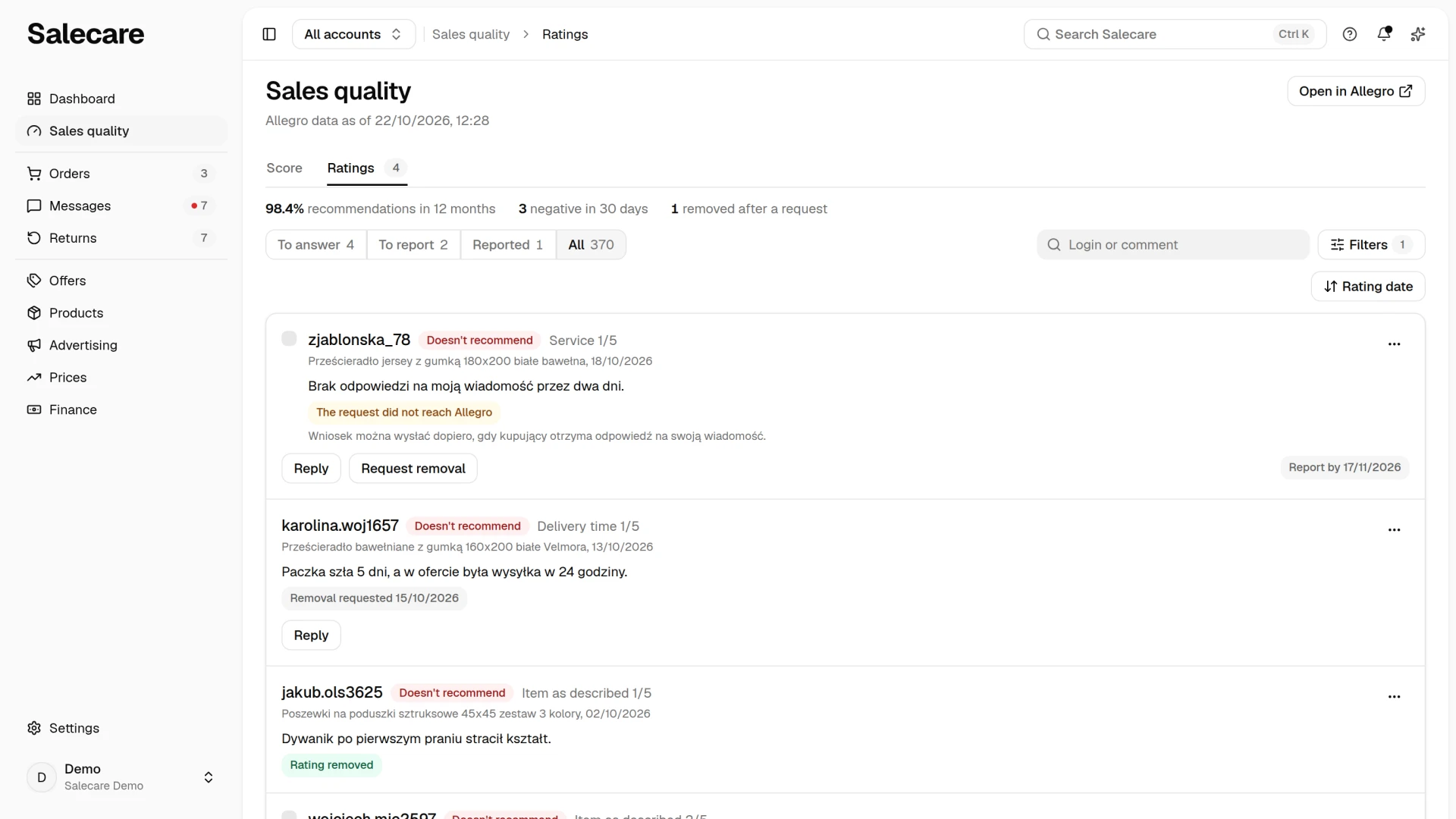
Above the list stands a line of three figures. The first is the recommendation rate counted the way Allegro counts it, the share of "Recommends" ratings among the ratings of the last 12 months that Allegro counts towards the average. The second is the negative ratings of the last 30 days, and the third the ratings removed after a request in the last 30 days. Ratings Allegro leaves out of the average, and ratings removed from Allegro, move none of these figures. Allegro counts one rating per buyer for purchases less than 3 days apart, so its percentage can differ slightly. The figures cover the account picked in the account switcher, and with "All accounts" all accounts together. They do not depend on the search or the filters of the list below.
Below stand the views, with the number of ratings in each. "To answer" holds the negative ratings you have not replied to, of any age, because Allegro sets no time limit on a reply. "To report" holds the negative ratings without a request that Allegro still lets you ask the removal of. "Reported" holds the ratings with a request that waits for the buyer. "All" is every rating of the picked accounts. A view with no ratings is not drawn unless it is open, and "All" always is. The tab opens on the first view with something waiting, which is "To answer", then "To report", and "All" when nothing waits. The row about ratings in the To do section on the Dashboard counts the negative ratings of the last 30 days without a reply. It opens the "All" view with those criteria, so it can show fewer ratings than the "To answer" view.
The search field looks through the buyer login and the comment of all ratings. A typed phrase opens the "All" view, and emptying the field returns to the previous view. The Filters button opens a panel with criteria such as Recommendation, Answer, Excluded from average, Product, Rating date, Report deadline, Removal requested and Removed from Allegro, and with all accounts also Account. You pick the order of the list in the menu above it, on a computer and on a phone. It holds Rating date, Report deadline, Request date and Order value, and the menu button names the field the list is ordered by. The rating date and the request date start with the newest, the report deadline with the nearest and the order value with the highest. Picking the same field again reverses the order, and Clear in the Filters panel leaves it as it is.
A rating row shows the buyer, their recommendation "Recommends" or "Doesn't recommend", the comment, your reply and the product with the rating date, and with all accounts also the account login. When the buyer gave one of the four detailed ratings below five stars, the row names the lowest, for example "Delivery time 2/5". You therefore see at once what the dissatisfaction is about. A rating that Allegro leaves out of the average carries the "Excluded from average" badge. The "Report by" badge with a date says until when you can still send a removal request, and it warns when 7 days or fewer are left to that date. Replying to a rating and requesting its removal are described in the guide to replies to ratings and removal requests.
Where to start improving
Set the order by how many points a measure can take away or give. The To do section sets it for you. On-time dispatch can take up to 460 points, because under 92% Allegro takes off 5 points for every 1%. Timely responses can take up to 285 points. So start with sending parcels on time and replying to messages within 24 hours, because that is daily work in which delays add up fast. Unresolved buyer issues can take off up to 200 points. Terms & conditions and rules takes off 50 points for each Allegro warning and 300 points for each account block. Among the positive points Fast dispatch gives the most, up to 160 points, followed by Fast payment refunds, up to 100 points. Fast payment refunds depend on you alone. Allegro counts the time in calendar days from the moment you receive the returned parcel to the payment refund, for returns of the last 30 days. It gives full points for a refund by 23:59 of the next day. Only payment refunds through Allegro Finance count, so money returned to the buyer another way does not help this measure. The guide to returns explains how to settle returns efficiently. Claim resolution time gives 50 points at most and takes nothing off.
What next
Missed discussions take points fast, because you have 24 hours to reply, and Allegro does not count Saturdays, Sundays and statutory days off. The guide to automating Allegro messages and discussions shows how automatic acknowledgements and AI drafts watch that deadline for you. Allegro warnings and the notifications about the badge are described by the guide to monitoring account health.