How to get the Allegro commission back after a return in 2026
Allegro gives the commission back on its own in many situations, for example when the buyer cancels the purchase or does not pay in time, and on a return through the Purchase history tab once you refund the payment through Allegro. A claim is needed above all when you cancel the order yourself, for example because the goods ran out, when an auction stays unpaid for 30 days, and when Allegro did not give the commission back on its own because one of its conditions was not met. Allegro accepts a claim only within 45 days of the purchase date, and after that the commission is lost. With a few dozen orders a month it is easy to miss a deadline and lose a commission Allegro would have given back.
Salecare watches this for you. The app reads your settlements, orders and returns. It finds by itself the orders cancelled, left unpaid or returned through the Purchase history tab for which Allegro has not given the commission back yet, and shows the amounts to recover and the deadlines. Once you switch automatic filing on, it also files the claims and tells you what Allegro did with them.
What a transaction rebate is and when Allegro refunds the commission
Allegro charges its sales commission at the moment of purchase. When the sale falls through, the seller can get it back. Allegro's terms call this a transaction rebate, and in the panel and the billing it shows up as a commission refund.
Allegro grants the rebate without a claim in these situations.
- The buyer cancelled an unpaid purchase. On an auction the rebate comes after about 7 days.
- The buyer cancelled a paid purchase and you refunded the payment through Allegro.
- Allegro cancelled the purchase itself because the buyer did not pay within the set time.
- The buyer did not pay for a purchase and within 24 hours bought again in the same offer, this time with a payment or cash on delivery.
- The buyer reported a return in the Purchase history tab and you refunded the payment through Allegro. When the reason given is goods other than ordered, a late delivery, a missing element, damage in an intact parcel or another defect, Allegro also requires a sale quality of at least "Neutral".
- The buyer sent the goods back without the Purchase history tab, you refunded the payment through Allegro, the buyer started no Discussion and your sale quality is at least "Neutral".
- The buyer did not collect the parcel, started no Discussion, and the tracking number added to the order shows the parcel was not collected. If the buyer paid through Allegro, the payment has to go back to them through Allegro.
A claim is needed in every other situation. Most often that is an order you cancel yourself, for example when the goods ran out at the wholesaler, an auction left unpaid for 30 days, and a situation from the list above where one of the conditions is missing, for example the buyer started a Discussion. You file the claim in Sales Center or with a button in Salecare.
A claim on which the buyer keeps the goods and gets only part of the money back gives no commission refund, because the sale went through. On a partial return the commission comes back only for the returned part.
There is one deadline. The claim has to be filed within 45 days of the purchase date, not of the return request, the parcel coming back or the claim being closed. Allegro names no hour, so Salecare counts the last, 45th day until midnight.
If the buyer paid through Allegro, the refund of that payment has to go through Allegro too, that is with the refund form in Sales Center, through the API or with an automatic refund. Allegro does not accept a transfer from your own bank account. A claim filed before the payment went back through Allegro is held for 24 hours and rejected if you do not order the refund within that time.
The transaction rebate covers the sales commission only. Allegro does not refund listing fees, promotion and highlighting fees or advertising costs, because those are charged for showing the offer, not for the sale. A commission already reduced to zero, for example by a rebate in the Allegro Prices programme, leaves nothing to recover, and Allegro rejects such a claim.
Allegro checks three conditions in data the claim itself does not carry. They are the refund of the payment through Allegro, the account's sale quality after a return for a defect, and the tracking number on an order payable on delivery. All three come back in step 2, because the automation in Salecare takes them into account.
Step 1. Open To recover
In the menu go to Finance, and in it to the To recover tab. The old addresses of the commission refund and anomaly pages and of their settings open this tab too. At the top stands the amount to recover. It is the commission of the requests waiting to be sent plus the part of the unusual fees above what you usually pay for that fee. Requests already sent to Allegro and cases already decided do not count in it. A fee of a new type counts in full. A day on which a fee was charged more often than usual adds nothing, because it is not known which charges were extra. An amount in another currency counts in zloty at the NBP average rate of the last business day before the day of the sale or the fee. Under the amount stands a line that says what the amount is made of, for example "120.00 zł of commission from 6 orders and 40.00 zł of unusual fees above the usual.", and the line "1,532.52 zł of commission recovered in 2026.". Below stand the Commission refunds and Unusual fees cards, and the second is described by the guide "How to check unusual Allegro fees". The count beside the name of the To recover tab is the number of cases waiting for you, that is requests to send and unusual fees to check. Until Salecare finds the first case, the tab only says when the commission to recover will appear. When nothing waits, it shows "Nothing to recover.".
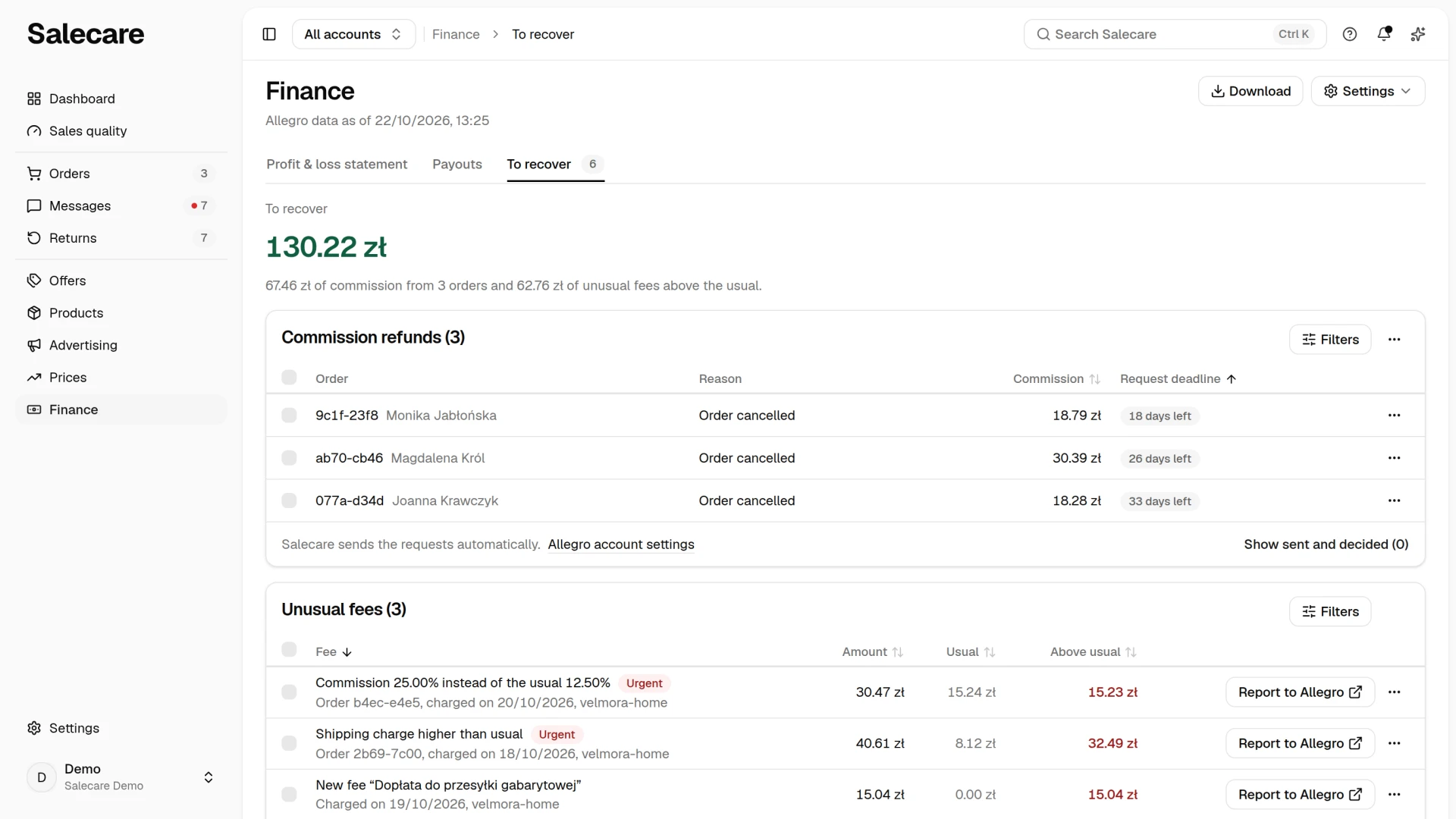
The Commission refunds card has the number of cases in its title and two views, which the link in the card's footer switches. The default view shows the cases to send, that is the requests nobody has filed with Allegro yet while the 45-day deadline is still running. The Show sent and decided (n) link opens the cases you no longer need to send, and the Show those to send (n) link goes back to the default view. The columns are Order (the number and the buyer, and for someone with access to orders also a link to the order), Reason ("Buyer returned the item", "Order cancelled" or "Buyer did not pay"), Commission and Request deadline. The Commission and Request deadline headers sort the list, and by default the case with the nearest deadline stands on top. On a phone the cases are rows of the card with a tick box, the row menu and the labelled values Commission and Request deadline, and the bar of the ticked cases stands under the card. You then pick the order in the menu above the card, with the same fields as the table headers. Picking the same field again reverses the order. The Request deadline column carries a badge with the number of days left, and on the final day the badge "Last day". You can send the request until midnight on that day. The badge counts the days from the purchase date, not from the day of the return. 45 days after the purchase the case loses that badge, and in the view of sent and decided cases its Status column shows "Past the deadline", because Allegro will not accept such a request. The Filters button narrows the list by reason, by the state of the case, by the state of the request, by the reason in the Needs a look field, by product, buyer, order, quantity, commission, deadline, the date the return was completed, the detection date and account. You can also file a request by hand in Sales Center by clicking Actions at the order and then Commission refund.
You send a request with Send request in the row menu, or in bulk. Tick the rows, and the action bar shows the Send requests (n) and Hide selected buttons. Salecare asks for confirmation before sending, because a sent request cannot be withdrawn. Hide works at once. The Undo button in the message at the bottom of the screen puts back what you just hid, and the case returns to the list to send. Nothing goes to Allegro until you confirm sending. In the view of sent and decided cases the row menu of a hidden case has Restore. The ⋯ menu above the list has Refresh request statuses, which asks Allegro at once for the decisions on the sent requests.
When the Allegro connection does not allow sending requests, a warning "Reconnect the account … so Salecare can send the requests." with a Reconnect button stands above the list. The account keeps working, but requests are not sent until you reconnect it. When access to payments is missing, the warning says "Reconnect the account … so Salecare checks payment refunds before it sends a request.". The button is shown to a person with the Integrations (accounts, API tokens) permission.
The view of sent and decided cases lists the cases you no longer need to send. The Status column says where a case stands.
- "Sent", while Allegro has not answered.
- "Granted", when Allegro accepted the request or the refund came in.
- "Rejected". The hint on the badge gives Allegro's reason or, when Allegro gave none, "Allegro gave no reason.". It also gives the date until which you can appeal.
- "Needs a look", when sending failed and the cause needs checking. The reason stands under the badge.
- "Past the deadline", when 45 days passed since the purchase and no request was sent.
- "Hidden", when the case was hidden.
Step 2. Switch on automatic filing
The footer of the Commission refunds card says how filing is set up. It reads "Salecare sends the requests automatically.", "Requests are not sent automatically for the account …" or, on a plan without the function, "Your plan does not include sending the requests automatically.". The Allegro account settings link in the footer leads to the settings. You can also get there yourself. In Settings open the Allegro accounts page and click the account this is about. In the After the sale group, in the Commission refund claims row, click Change, switch on Send commission refund claims automatically and click Save. Salecare asks for confirmation before switching it on. The setting applies to that one account only, because the claim is filed in its name. The main shop's account can therefore file on its own while you file by hand for an outlet account. When commission refund claims wait on the account and you send them by hand, the account settings show a Recommended to start block at the top with the number of claims and the amount to recover. The Turn on button in that block also asks for confirmation first and switches automatic sending on for the cases found from then on. You send the claims already waiting from the list that the Show claims button in the message after the save opens. The Not now button hides the block on that account for the whole company.
Filing claims automatically is part of the Business plan and up. On a lower plan the switch can still be turned on, but the text beneath it says that nothing changes. You then keep filing with Send request in the row menu. The case list, the deadlines and manual filing work on every plan.
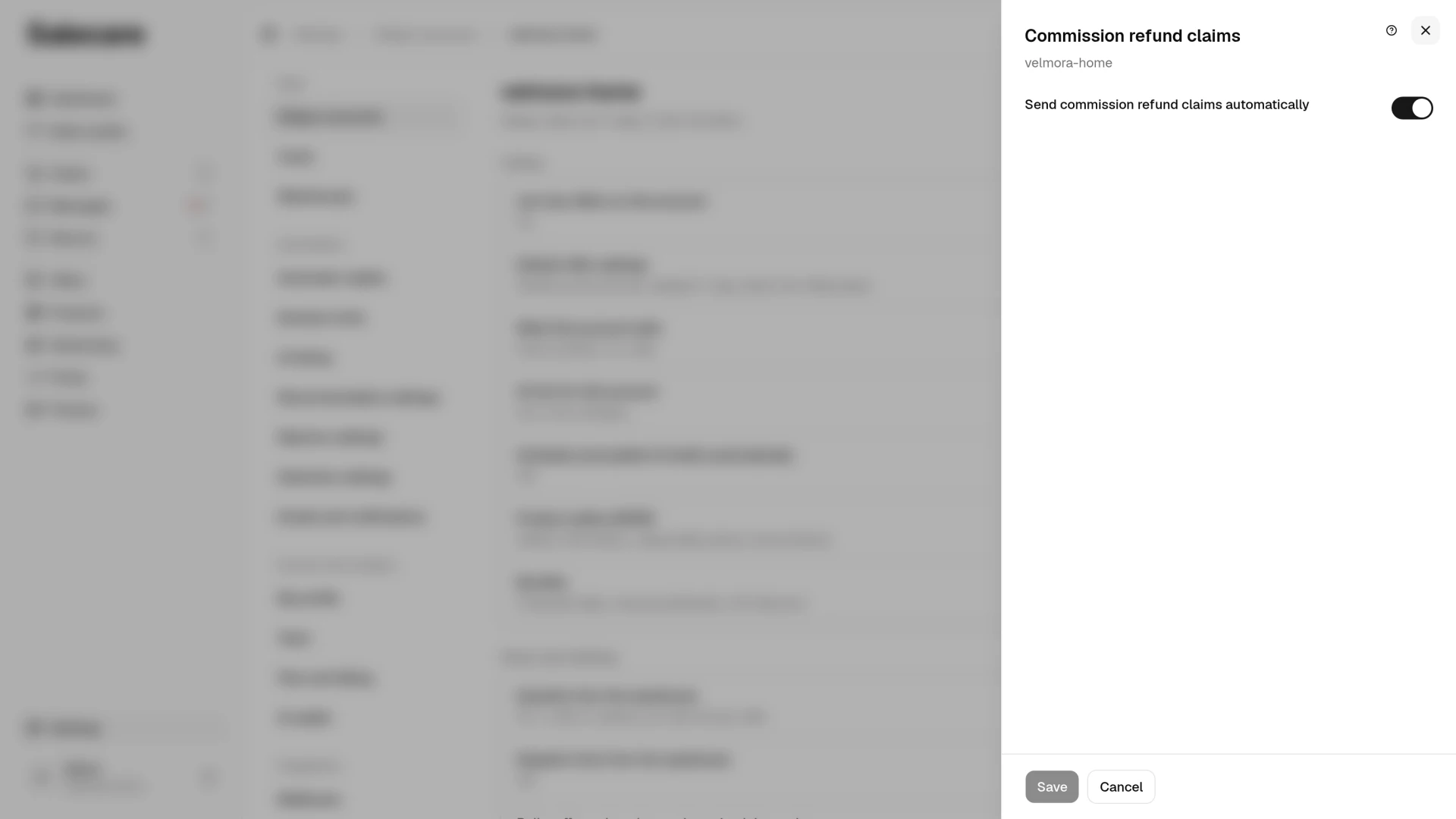
The automation files every case Salecare detects, a return, a cancellation and an unpaid order. It holds back three situations that Allegro settles on data the claim itself does not carry.
The first is a return or a cancellation of an order paid through Allegro on which Allegro shows no refund of the buyer's payment. Allegro gives the commission back only when the payment goes back through Allegro, so the case waits for you and the reason reads "Payment not refunded through Allegro". Refund the payment through Allegro and submit the claim. Salecare checks this in Allegro only when the connection holds the payments read permission. Without it the automation files the claim without this check, and a warning with a Reconnect button stands above the Commission refunds card.
The second is a return for goods other than ordered, a late delivery, a missing element, damage in an intact parcel, doubtful originality or another defect, on an account whose last known sale quality is lower than "Neutral", that is at the "Needs improvement" level. After such a return Allegro rejects the claim, so the case waits for you and the reason reads "Sale quality lower than Neutral". A return for another reason, for example because the buyer did not like the product, is filed whatever the sale quality.
The third is a shipped order payable on delivery that carries no tracking number in Allegro and whose goods did not come back through the buyer's Purchase history tab. Allegro rejects a claim in that case, so it waits for you and the reason reads "No tracking number". A cash-on-delivery order cancelled before dispatch has no parcel and no number, so the automation files it like any other and Allegro decides.
All three stay in the view of cases to send. You pick the reason in the Filters panel, in the Needs a look field, and once sent it shows in the Status column. You can file any of these cases yourself with Send request in the row menu. A claim you send by hand always goes to Allegro, because you may know something the app does not. The payment may already have gone back through Allegro, a tracking number may have been added in the Allegro panel a minute ago, and the sale quality may have recovered.
How it works from there
Newly detected cases are filed with Allegro without your involvement, apart from the three held back above. Claim statuses update in the list, and you learn of Allegro's decision from the bell. Salecare tells you about the accepted claims, with the amount Allegro gave back, and about the rejected ones, with the date until which you can appeal. When Allegro puts a claim on hold because it does not see the payment refunded through Allegro, the bell says so at the next status check, within 3 hours at the latest, because 24 hours from filing are left for the refund. Salecare also emails you about a rejection and a hold if the Commission refunds topic on the Emails and notifications page is on. With the same setting, Salecare also emails you about the claims waiting for you. The message gives their number, the total amount and the nearest deadline with the days left to it, and lists the cases with the nearest deadline with a link to the order in Allegro. It arrives at most once a day, and only on a day Salecare detects a new case.
The cases the automation did not file wait for you in the view of cases to send, and 45 days after the purchase their commission is lost. These are the cases held back with a stated reason and the cases detected while the automation switch on the account was off, the company's plan was below Business or the Allegro connection was missing the orders write permission. The email about the claims to submit does not remind you of them on a day with no new case, so check that view regularly. To get a reminder that does not depend on new cases, add a "Missing commission refunds" rule on the Emails and notifications page. The rule lists the cases to submit daily, weekly or monthly, depending on the frequency you pick. Leave its Only new items option off, otherwise it skips the cases the previous summary already listed.
The row of commissions and unusual fees to recover in the To do card on the Dashboard opens the To recover tab in Finance. Its amount is the amount that tab starts with, that is the commission to claim back and the part of the unusual fees above what you usually pay. A one-off burst in the number of fees adds nothing to it. The morning report gives the same amount. Requests already with Allegro and cases already decided do not count in it. How much has already been recovered is given by the line "… of commission recovered in …" under the amount at the top of the tab.
Needs a look, and what to do with each reason
When Salecare cannot file a request by itself, the case gets a reason. You pick the reason in the Filters panel, in the Needs a look field, and in the view of sent and decided cases it stands under the "Needs a look" badge in the Status column. The first four reasons leave the case in the view of cases to send, because you can fix them or send the request despite them. The rest are final.
- "Reconnect required". Reconnect the account with the Reconnect button above the list, then send the request.
- "Sale quality lower than Neutral". After such a return Allegro rejects the request. Send it only once the sale quality of the account is back at "Neutral" or higher.
- "No tracking number". Add the tracking number to the order in the Allegro panel, then send the request.
- "Payment not refunded through Allegro". Refund the payment to the buyer through Allegro, then send the request.
- "45-day window passed". Allegro will not accept the request any more, so hide the case.
- "Already claimed". Another request already covers the commission of this line, for example one filed by hand in the Allegro panel. Check its decision there, and hide the case in Salecare.
- "Can't file automatically". Salecare found no line that can be claimed, or Allegro judged the request invalid. Check the order in Allegro and, if the request makes sense, file it by hand in Sales Center by clicking Actions at the order and then Commission refund.
- "No commission to refund". Allegro answered that this line has no commission left to give back. That happens when an earlier discount removed the commission or it was not charged. Check the order settlement in the Allegro panel before you hide the case.
Older cases with the reasons "Buyer claim" and "Undelivered package" stay on the list and you can still send or hide them, but Salecare no longer creates new cases for these reasons.
How Salecare finds commission refunds
Salecare reads what it synchronises from your Allegro account anyway, the billing (commission and commission refund entries attached to orders) and the orders and returns. A case is raised when an event on the order entitles you to a refund, the 45 days from the purchase are still running, and the billing holds no entry giving that commission back.
The scan checks three kinds of events.
- Buyer returned the item. A return completed within the last 45 days, on an order placed no more than 45 days ago. The amount is the share of the order's commission matching the value of the returned items, so a return of one of two products raises a case for that one only. A return Allegro marked as settled with a commission refund raises no case, even when the billing entry has not arrived yet.
- Order cancelled. An order cancelled within the last 45 days and placed no more than 45 days ago. If the buyer had paid, the case carries the reason "Order cancelled", otherwise the reason "Buyer did not pay".
- Buyer did not pay. An order still unpaid at least 7 days after it was placed.
The scan does not check claims and undelivered parcels on their own. A claim on which the buyer sent the goods back through the Purchase history tab is a case with the reason "Buyer returned the item" in Salecare. Salecare does not detect a return sent back without that tab, nor an uncollected parcel, until the order is cancelled in Allegro. In such situations Allegro gives the commission back on its own only on the conditions in the list at the start of this guide. The buyer must not start a Discussion, a return without the Purchase history tab also needs a sale quality of at least "Neutral", and an uncollected parcel needs a tracking number on the order. When a condition is missing, the commission comes back only after a claim you file by hand in Sales Center within 45 days of the purchase. Allegro then asks the buyer by email why they dropped the purchase. It rejects the claim when the buyer answers that the contract was not performed for reasons beyond their control, for example a defect. It also rejects it when the buyer does not answer but opened a Discussion, or when the parcel history shows no refusal. Such a claim therefore stands a chance mainly when the buyer dropped the purchase of their own accord. Older cases with the reason "Buyer claim" or "Undelivered package" stay on the list, and you can still send or hide them. Salecare no longer raises new cases on these grounds.
Before a case reaches the list, Salecare gives Allegro up to 7 days to refund the commission on its own, because Allegro returns part of it by itself with a delay in the billing. That waiting time shrinks as the 45-day deadline approaches and drops to zero at the end, so a case never appears past the deadline.
The scan runs once a day at 05:00 on every account, and also right after the first synchronisation of a newly connected account. Each kind of event is checked and saved on its own, so an error in one never stops the others. Every scan re-measures open cases against the current billing, so when an entry giving the commission back appears there, or Allegro marks the return as settled with a commission refund, the case closes as "Refund received" without a claim, and a partial refund lowers the amount to recover.
Every case has one of three statuses, which you pick in the Status filter.
- "To recover", until Allegro gives the commission back.
- "Refund received", when the money came back.
- "Dismissed", when the case was hidden with Hide in the row menu or with the Hide selected button. Any case can be hidden unless its claim is waiting for Allegro's decision or Allegro has accepted it, so a case with a rejected claim can be hidden too. Hiding a case in Salecare does not withdraw a claim filed with Allegro.
The card's two views split the cases by whose move it is. In the view of cases to send the move is yours, and in the view of sent and decided cases the case waits for Allegro or is already closed.
The claim itself has four states, which you pick in the Request status filter.
- "Claim submitted", while it waits for a decision. When Allegro holds it because it does not see the payment refunded through Allegro, the claim still waits for a decision, and the bell reports the hold.
- "Claim accepted", once Allegro has granted it.
- "Claim rejected", once Allegro has turned it down. In the Status column the case then has the badge "Rejected", and the hint on the badge gives the date until which you can appeal in Allegro.
- "Manual follow-up", when Salecare could not file it, with the reason stated, such as "45-day window passed", "Already claimed" or "No commission to refund". The case then has the badge "Needs a look" in the Status column, and the reason stands under the badge.
Salecare files the claim the way Allegro requires, separately for each line of the order, with the number of units that actually came back. An order with three returned lines is three claims in Allegro, shown on the list as one case.
An automatic claim is created when the case is detected and only then. The automation checks whether the company's plan includes automatic filing, whether the switch on that account is on and whether the connection holds the orders write permission. It never revisits earlier cases, so after updating the permissions or refunding the payment through Allegro you send the backlog with Send request in the row menu or, after ticking several, with the Send requests (n) button. Sending by hand does not check the three conditions of step 2, so before you send the backlog make sure the payments went back to the buyers through Allegro and the shipped cash-on-delivery parcels carry a tracking number in Allegro.
Salecare checks the statuses of submitted claims in Allegro every 3 hours, and Refresh request statuses in the ⋯ menu above the list does it right away for your company. A positive decision closes the case as "Refund received", which the Status column shows as "Granted", and records the amount Allegro actually returned. That amount, not the estimate on the list, goes into the line "… of commission recovered in …" at the top of the tab. When Allegro grants the refund for only some lines of the order, the case also closes as "Refund received" with the amount actually returned, and the bell mentions only the grant. Salecare no longer follows the rejected line, so check it in the Allegro panel and appeal there if needed, within 120 days of filing the claim. A claim under review stays in the view of sent and decided cases until the decision. Salecare keeps checking a rejected claim in Allegro once a day, as long as the appeal form covers it or Allegro is reviewing an appeal. Refresh request statuses also checks the claims with an appeal in progress right away. A claim you withdraw yourself in Allegro closes as rejected, but Salecare does not announce it as a rejection.
The count beside the To recover tab in Finance counts the requests to send and the unusual fees to check, and the amount is given by the row in the To do card on the Dashboard. The cases of an account disconnected from Allegro stay on the list, because the 45-day deadline runs whatever the state of the connection. No claim from such a case reaches Allegro until you connect the account again, and the case gets the reason "Reconnect required".
How much commission is at stake in a month
Take an invented bedding shop selling sets at 129 zł with an 11% commission. The figures are round and invented, but the mechanism is the same in every category.
- The commission on one set is 129 zł × 11% = 14.19 zł.
- Thirty sets come back in a month. For 27 of them the buyer sent the goods back through the Purchase history tab and got the payment back through Allegro, so Allegro gave the commission back on its own and those returns need no claim.
- What remains on the list in Salecare is the rest, 3 returns whose commission did not come back within a week, 4 orders you cancelled yourself because the wholesaler ran out of sets, and 2 auctions the buyers never paid. That is 9 cases, together 9 × 14.19 zł = 127.71 zł a month.
- Over a year that is 12 × 127.71 zł = 1,532.52 zł, almost 12 sold sets.
Most money stays with Allegro on orders you cancelled yourself, which Allegro settles only on a claim, and on returns where the payment went back to the buyer by bank transfer instead of through Allegro. Allegro does not accept such a return, so refund the payment through Allegro before you file.
A partial return is counted proportionally. The buyer ordered a set for 129 zł and pillowcases for 71 zł, 200 zł in total, and the commission on the whole order came to 22 zł. They sent back only the set. The returned part is 129 zł of 200 zł, that is 64.5% of the order value, so the case in Salecare is for 64.5% of 22 zł, which is 14.19 zł. The commission on the pillowcases stays with Allegro, because that sale went through.
Common mistakes
- Counting the 45 days from the return instead of the purchase. A return completed on day 40 leaves 5 days for the claim, and a later claim is refused. Salecare shows the case with the status "Past the deadline" in the view of sent and decided cases. A return completed more than 45 days after the purchase raises no case any more.
- Refunding the payment by bank transfer instead of through Allegro. If the buyer paid through Allegro, Allegro gives the commission back only when the payment goes back through Allegro. A claim filed without that refund is held for 24 hours and rejected.
- Waiting for Allegro to refund the commission on its own after a cancellation you made yourself. Allegro settles by itself a cancellation by the buyer and a cancellation for a payment not made in time, but an order cancelled by the seller needs a claim, and so does an auction left unpaid for 30 days. Without a claim the amount is gone 45 days after the purchase.
- Claiming fees Allegro never refunds. Listing, promotion, highlighting and advertising fees are not the sales commission. A claim for a commission already reduced to zero, for example in the Allegro Prices programme, is refused with the reason "No commission to refund".
- A cash-on-delivery parcel without a tracking number in Allegro. If the parcel went out, Allegro holds no tracking number for it and the buyer did not send the goods back through the Purchase history tab, Allegro rejects the claim. Add the number in the Allegro panel before you file, and the case in Salecare waits with the reason "No tracking number".
- A connection without the orders write permission. An account connected before this feature existed cannot file claims, so the automation sends nothing and a warning stands above the list. Click Reconnect, refund the pending payments through Allegro, add the missing tracking numbers, and only then send the backlog with the Send requests (n) button.
Questions about Allegro commission refunds
Does Allegro refund the commission by itself, without a claim?
Yes, in many situations. Without a claim Allegro settles a cancellation by the buyer, a cancellation for a payment not made in time, a duplicate purchase, a return with the payment refunded through Allegro and an uncollected parcel with a tracking number on the order. Some of them also require no Discussion or a sale quality of at least "Neutral", and the full list is at the start of this guide. A claim is needed above all for an order you cancelled yourself and for an auction left unpaid for 30 days. Salecare gives Allegro up to 7 days for that and only then lists the case. If the commission comes back later, the next scan closes the case as "Refund received".
From which day do the 45 days count?
From the purchase date, the day the buyer placed the order. A return request, a parcel coming back or a closed claim does not stop the clock. The Request deadline column counts from the same date as Allegro, so the badge shows the days that are really left. In Salecare the last, 45th day lasts until midnight, because Allegro names no hour.
The claim was already filed by hand in the Allegro panel. What does Salecare do?
It does not file a second one. Allegro accepts one claim per order line, so Salecare finds the existing claim, records it on the case and follows its decision as its own. It takes the day the claim was created in Allegro as the filing date, so the appeal date after a rejection counts from that day. Once Allegro grants it, the case closes as "Refund received" with the amount Allegro stated.
Does the payment method matter?
What matters is the way the payment goes back. If the buyer paid through Allegro, the refund has to go through Allegro too, with the refund form in Sales Center, by accepting the return in Salecare on an account that sends return decisions to Allegro, or with an automatic refund. Allegro rejects the claim when the payment went back by a transfer from your account. On cash on delivery Allegro never took the payment, so it is refunded outside Allegro, and the only condition is the tracking number of the shipped parcel, which Allegro requires when the goods did not come back through the Purchase history tab.
What does the status "No commission to refund" mean?
Allegro answered that no commission is left to give back on that line, but it gives no reason. This happens when an earlier rebate removed the commission, for example in the Allegro Prices programme, or when Allegro never charged it. Check the order's billing in the Allegro panel before you hide the case.
Allegro rejected the claim. What now?
Salecare tells you in the bell, and by email if the Commission refunds topic on the Emails and notifications page is on. The case moves to the view of sent and decided cases with the badge "Rejected" in the Status column. The hint on the badge gives Allegro's reason and the date until which you can appeal, because the appeal form in Allegro covers the claims of the last 120 days. If the rejection is justified, hide the case. If not, appeal in the Allegro panel. Salecare checks once a day in Allegro what happened to the claim. When Allegro grants the refund on appeal, Salecare tells you in the bell, records the amount Allegro returned and closes the case as "Refund received". When Allegro turns the appeal down, the appeal date disappears, because that decision of Allegro's is final.
What next
Commission refunds are one side of the coin. The other is the cost of the return itself. Set it in Settings on the Costs page, in the Returns row, so that your margin also accounts for handling returns. See the guide "How to set up costs and margin to see your real Allegro profit".