How to relist ended offers
When an offer loses its last unit, Allegro ends it at once, because it does not let an active offer stay listed with no units. An ended offer does not vanish straight away. You can relist it for 60 days after the end, and after that Allegro moves it to the archive and it can no longer be relisted. A relisted Buy now offer comes back under the same number and address. If you relist it within 30 days of the end, it also keeps part of its popularity, and the sooner it returns, the more it keeps. A new offer listed in its place starts from nothing. Salecare can relist ended offers once the goods are back in the warehouse, so you do not have to hunt for them by hand. You can also relist chosen offers yourself with the Relist entry on the offers list, as step 5 describes.
Relisting sends the quantity from your Salecare warehouse to the offer. That is why it belongs to the Pro plan and above, like stock updates on offers. On a lower plan the relisting row shows a padlock with the name of the plan the feature works from. For the same reason relisting covers only accounts that take their quantity from the warehouse, as step 1 describes.
Step 1. Answer the relisting question
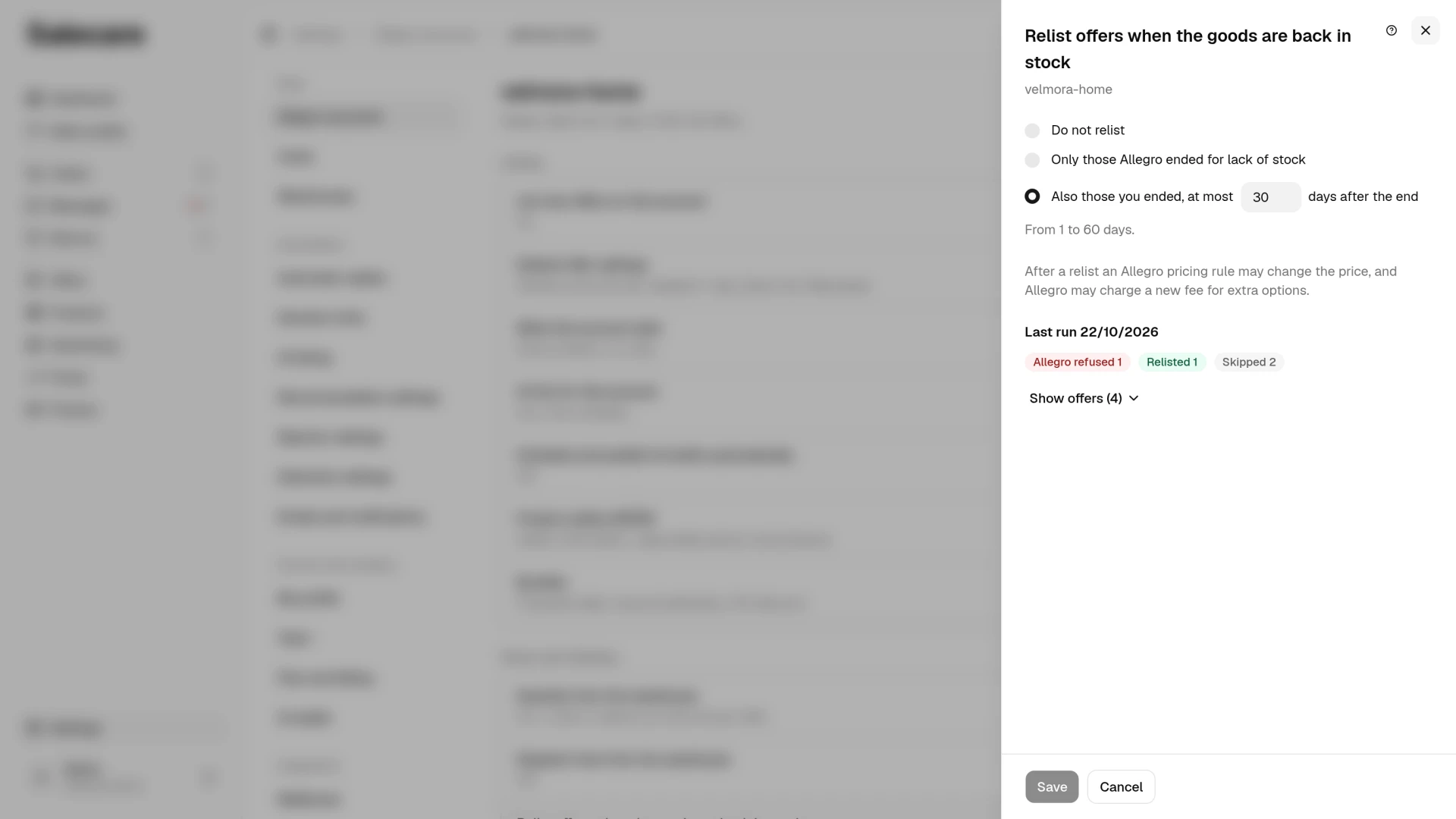
You set relisting separately for each Allegro account, with one question. On the Settings page open Allegro accounts and click the account. In the Stock and relisting group, in the Relist offers when the goods are back in stock row, click Change. The panel has three answers.
- "Do not relist". Salecare relists no ended offer of this account.
- "Only those Allegro ended for lack of stock". An offer Allegro ended because the goods ran out comes back.
- "Also those you ended, at most N days after the end". Offers you ended come back too, as step 2 describes.
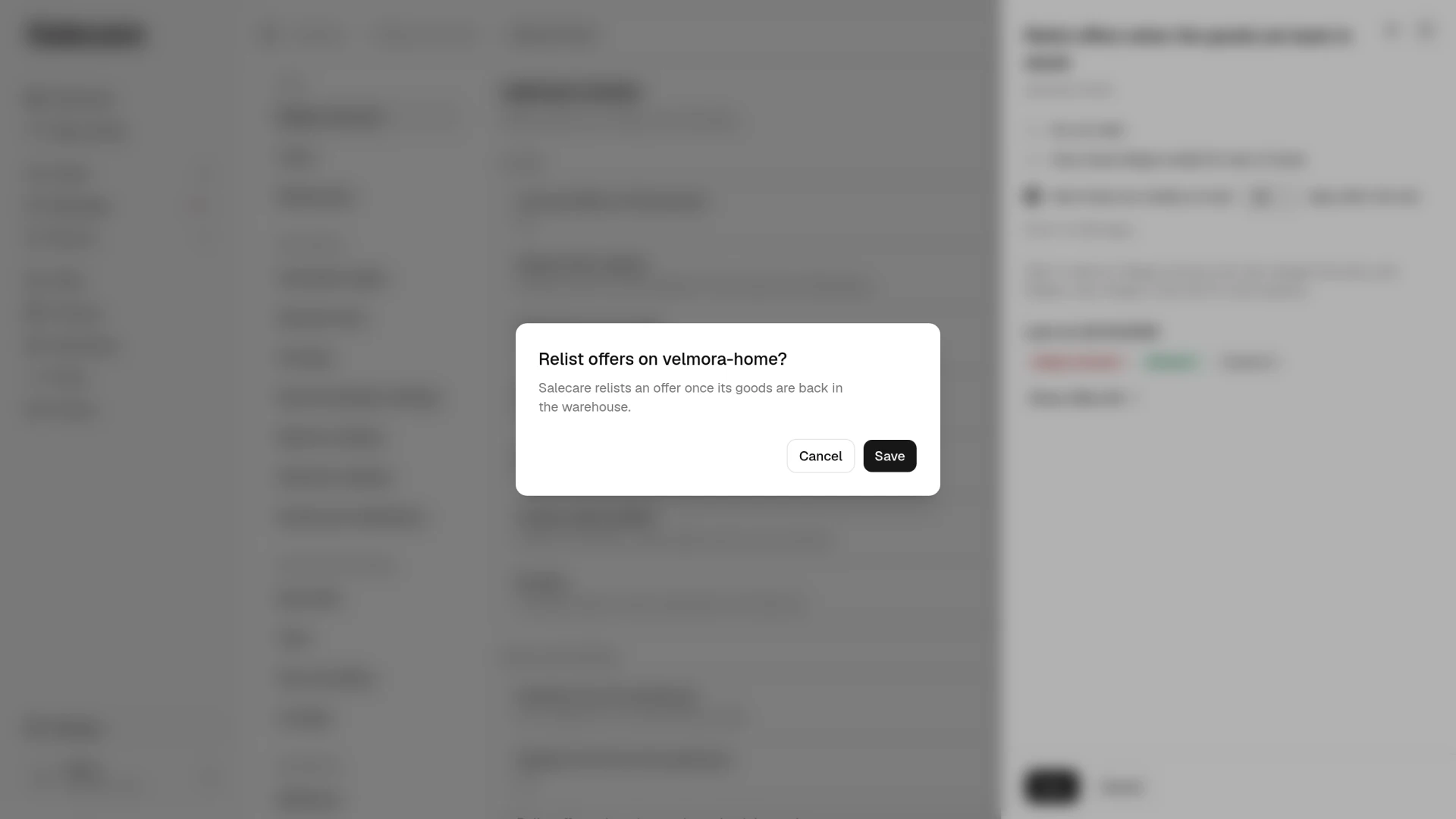
Pick an answer and click Save in the panel. When the account has relisted no offer so far, Salecare asks before saving and says how many ended offers of this account have goods in the warehouse now. When there is no such offer, the question says "Salecare relists an offer once its goods are back in the warehouse." If the account did not relist offers Allegro ended until now, Salecare relists them in the morning run at 6:50, so the offer comes back the next morning. Accounts set up earlier keep relisting the way they did. They relist in the morning run at 6:50 or as soon as the goods arrive through stock updates, as described further down this step. An account that so far relisted only offers you ended has a fourth answer, "Only those you ended, at most N days after the end". Once you pick another answer, that one cannot be brought back.
Relisting works only on an account that takes its quantity from the warehouse, that is with the Quantity from the warehouse row on. A relisted offer gets its quantity from the Salecare warehouse, and that stock is up to date only while orders reduce it. On an account where you set the quantity by hand on Allegro, Salecare relists no offer, also with the answer from step 2. The relisting row then says "Not working, because Quantity from the warehouse is off". In the panel the Change button next to the note opens the Quantity from the warehouse panel.
The morning run at 6:50 looks for this account's offers that Allegro ended because they ran out of stock. It takes the ones whose matched product has stock again in a warehouse not excluded from Allegro. A bundle offer comes back once the stock of its components makes up at least one whole bundle again. The offer comes back under the same number with the quantity from the warehouse less the reserve. That quantity is no more than the value of the Most units per offer field in this account's Quantity from the warehouse panel. An offer whose stock is not above the reserve waits.
Before every relist Salecare reads the offer on Allegro and checks who ended it and why. The answer "Only those Allegro ended for lack of stock" relists only an offer Allegro ended for lack of stock. Offers you ended come back only with the answer from step 2. Offers Allegro ended for another reason, for example when their duration ran out or for breaking the rules, never come back. Only Buy now offers are relisted, because only they keep their number and popularity. Salecare skips auctions, and Allegro does not let a classified ad be relisted at all. An offer that ended for lack of stock more than 60 days ago is no longer taken, because Allegro has archived it. A cross-sell bundle published on the offer stays published and comes back with it. The exception is a bundle whose two offers newer published bundles both took during the break. At the next offer sync Salecare asks Allegro about the old bundle and withdraws it when Allegro no longer shows it on either of its offers, as long as the account has permission to edit offers. A bundle that shares only one offer with a newer one stays published. The guide "How to switch on automatic cross-sell bundles" gives the details.
Salecare also skips a product that has a live offer on this account or an offer newer than the ended one, and a product that got a new draft from the day the offer ended, for this account or for no account yet. A draft meant only for other accounts does not block the relist. So out of several ended offers of one product, at most the one that ended last comes back, and an offer that was replaced by a new one does not return beside it.
One run relists at most 300 offers per account, starting with the ones that ended most recently, and takes the rest the next morning. An offer that waits for stock above the reserve, for a whole pack or for a whole bundle takes no place in that limit. An offer Salecare has already tried to relist is taken again only after 20 hours. After an Allegro refusal Salecare therefore tries again the next day, not over and over.
Some accounts already relisted offers as soon as the goods arrived. On such an account stock updates relist the offers ended for lack of stock straight away, without waiting for the morning. The daily relisting there covers only the offers you ended, so no offer is relisted twice. When the read from Allegro shows that an offer the daily relisting picked up ended for lack of stock, Salecare skips it with the reason "Ended for lack of stock, and on this account stock updates from the warehouse relist such offers".
Stock updates do not relist an offer that was replaced after its end by a new offer of the same product on this account, even when that new offer has ended since. Unlike the daily relisting, though, stock updates relist an offer beside a live offer of the same product listed before its end, for example a 3-pack offer beside the single-unit offer, and do not check drafts.
Step 2. Relist offers you ended only on purpose
The answer "Also those you ended, at most N days after the end" adds to the offers of step 1 the offers that were ended by hand in Salecare or in Allegro. Such an offer comes back in the morning run at 6:50 when the product is in stock and no more days have passed since the end than you type in the box inside that answer, in place of N. The box takes 1 to 60 days, 30 by default. Salecare changes a number outside that range to the nearest bound before saving. The upper bound is 60 because Allegro archives the offer after that many days, and an offer relisted within 30 days keeps the most popularity. An offer whose end date Salecare does not know does not come back with this answer.
The same protection as in step 1 applies. Salecare skips a product that has a live or newer offer on this account, and a product that got a new draft for this account, or for no account yet, after the offer ended.
Pick this answer deliberately. At the next daily relist at 6:50 Salecare would relist offers that were ended on purpose, for example because of a faulty batch or a wrong price. So the dialog for ending offers on the offers list shows a yellow note with the account name when one of the offers being ended belongs to an account with this answer. If you end offers for a holiday, do not pick this answer. For a holiday Allegro has the Sales break. It suspends every offer of the account for up to 30 days and then brings them back on its own, and the dialog for ending offers links to it. The break does not stop Salecare from relisting, though, because Allegro accepts relists sent by outside tools while it lasts. So for a Sales break, pick "Only those Allegro ended for lack of stock" or "Do not relist".
Step 3. Check the last run and the notification
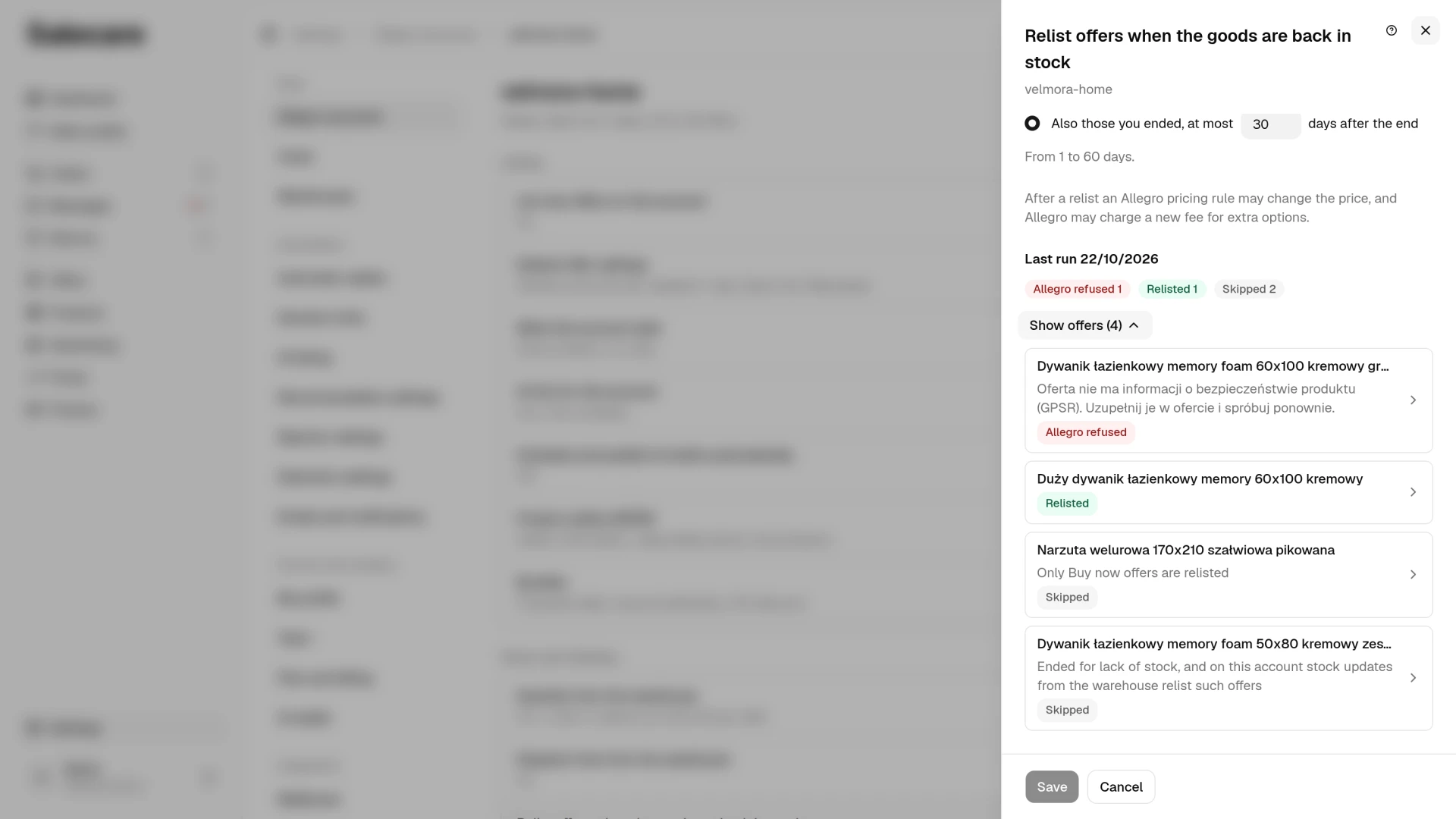
Once Salecare has tried to relist an offer of this account, the last run and its date appear at the foot of the relisting panel. The counts say how many offers were relisted, how many Allegro refused, how many it did not relist despite accepting the request, how many wait for confirmation, how many Salecare skipped and how many Allegro has already archived. The "Skipped" count covers only offers Salecare read on Allegro. An offer skipped before the read never joins the run, so it is in neither the counts nor the list. That is an offer whose product has another live or newer offer or a new draft, and an offer whose stock is not above the reserve. Under the counters sits a list of up to 20 offers, folded under the Show offers (N) button. The ones that need your attention come first, that is Allegro refusals and relists that did not work. The relisted offers follow, and the skipped ones come last. A refusal shows the reason in Allegro's own words, and a skipped offer shows the reason Salecare gives, for example "Only Buy now offers are relisted". Clicking an offer on this list opens it on the offers list with the offer status set to "All", so an offer that is still ended shows too. When Salecare sent no relist to Allegro in the last run, the panel says so plainly, and each listed offer shows why. Until relisting has tried the first offer on this account, the panel shows no run.
Allegro's answer to a relist is not yet proof that the offer is back on sale. So Salecare reads the offer 15 seconds, one minute and 4 minutes after sending the relist. An offer none of those reads showed as active gets the state "Allegro did not relist it". Salecare retries refusals and failed relists the next day, so an offer fixed in the meantime comes back on the following run.
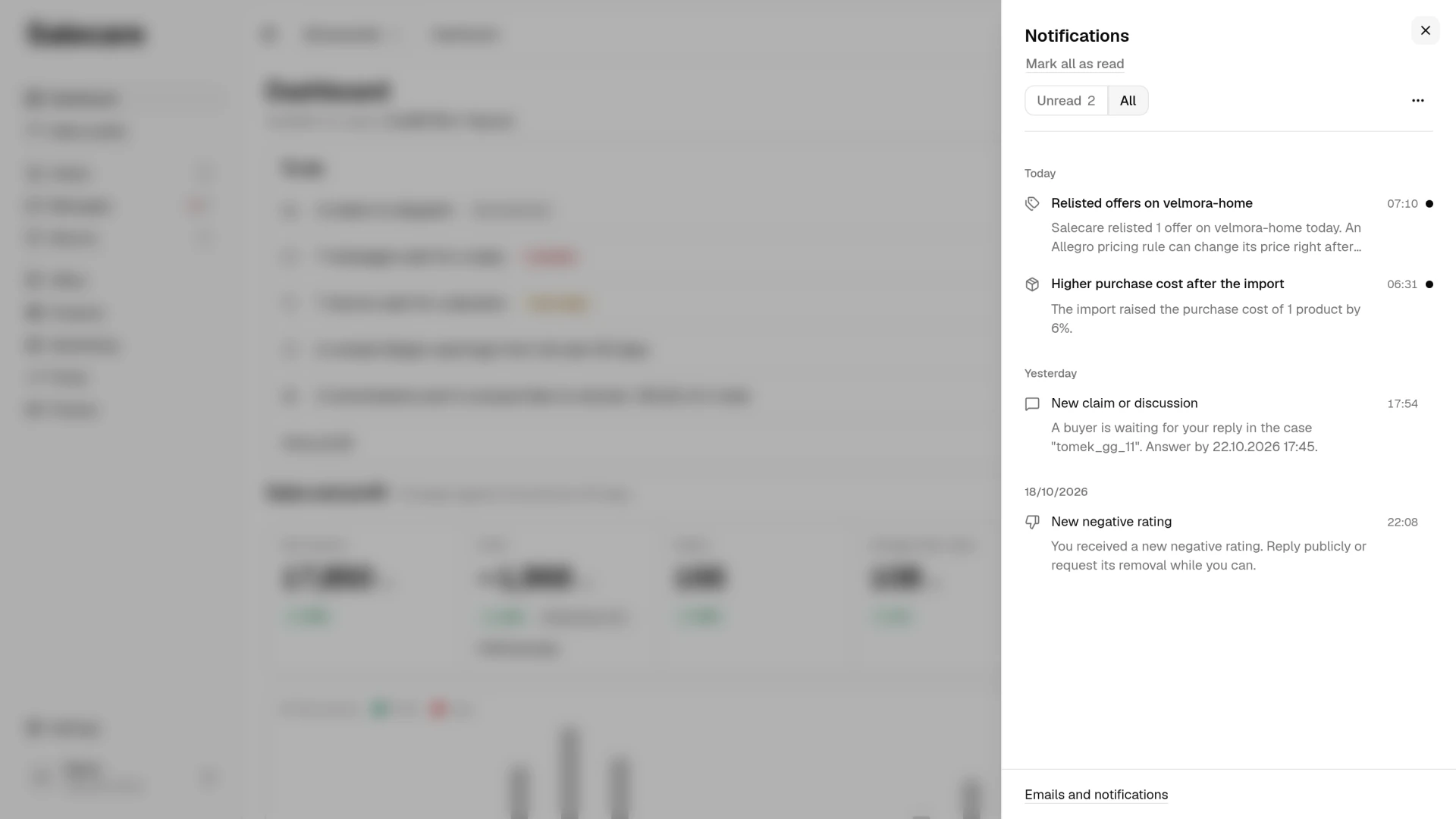
About 20 minutes after the run, the bell shows a notification titled "Relisted offers on" followed by the account name. It gives the number of relisted offers and, when Allegro did not relist some, the number of those offers, the name of the first one and the reason. Clicking it opens the account settings with the relisting panel. One account gets at most one such notification a day, and it goes to the bell only, with no email. A run that only skipped offers sends no notification.
A line in the relisting panel reminds you of two things that depend on Allegro. The notification reminds you of the first of them. An Allegro pricing rule can change the offer's price right after the relist, and Salecare then picks up the new price together with the relist confirmation. A relist also resumes the fees. If the fee cycle for the listing, a promotion or extra options is still running, Allegro charges nothing at once, and if it has already ended, Allegro starts a new cycle and charges for it.
Salecare does not change the price on a relist and does not compare it with the purchase cost or the commission. The offer comes back with its price from before the end, unless an Allegro pricing rule changes it, even after a break of several weeks. If the purchase cost changed in the meantime, check the price of the relisted offer.
Step 4. See the relist in the offer history
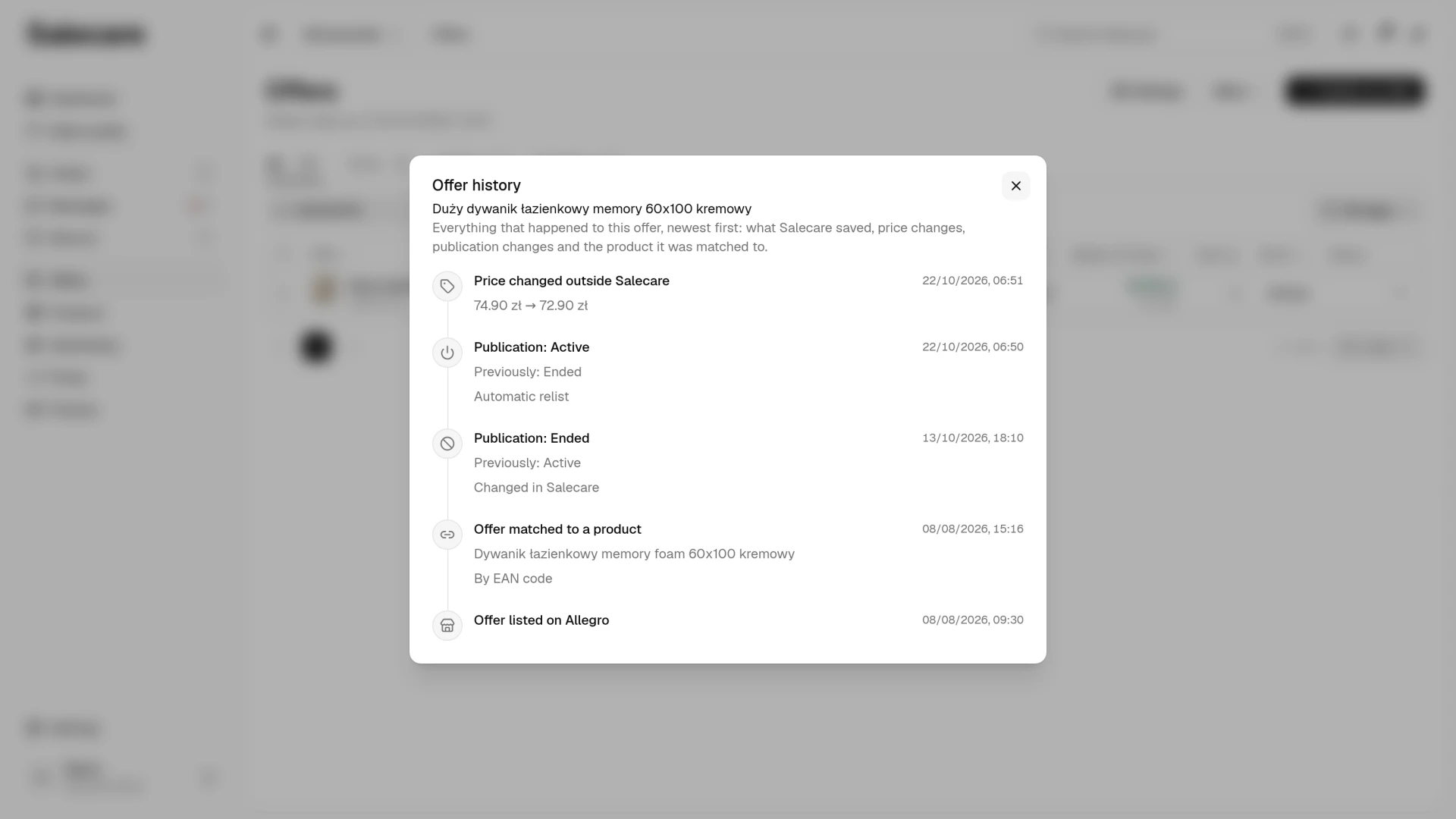
Every relist Allegro confirmed goes into the offer's history. The Offer history item opens it, in the action menu in the offer's row on the offers list or in the More menu in the header of the offer editor. On the timeline you will see the entry "Publication: Active" with the earlier state "Previously: Ended" and the source "Automatic relist". A relist made by stock updates from the warehouse has the source "Warehouse stock rule".
The entry appears only once a read from Allegro shows the offer as active, so the history never shows a relist Allegro did not make. If an Allegro pricing rule changed the price on the relist, the entry "Price changed outside Salecare" with the price before and after sits beside it. When the read before the relist shows the offer is already active, because someone relisted it by hand, Salecare sends nothing. The last run then gives the offer the reason "The offer is already active", and the history gets an entry with the source "Changed outside Salecare".
Step 5. Relist an offer yourself from the offers list
You do not have to wait for the morning. On the Offers page set the Offer status criterion in the Filters panel to "Ended" or "All" and select the ended offers. Then open the More menu in the bar above the table and click Relist. You can relist a single offer from the action menu in its row too, and on a phone from the menu on the offer card. There is no Relist entry on a live offer or on an offer Salecare knows Allegro has archived. An offer that ended more than 60 days ago may still have it. After the click, the bell then says the offer is already in the Allegro archive and cannot be relisted.
In the dialog you give the quantity after the relist, at least 1, because Allegro does not relist an offer with no goods. An offer whose stock the Salecare warehouse keeps comes back with the warehouse quantity, and stays ended when the warehouse holds none. A bundle comes back with as many whole bundles as its components in the warehouse make up. Before the relist Salecare checks on Allegro why the offer ended. An offer you ended, one that ran out of stock and one whose duration ran out come back. An offer Allegro ended for another reason, for example a rule breach, and an auction stay ended.
After the click a message says how many offers Salecare sent to be relisted and how many it skipped. With more than 200 offers selected, the relist runs in the background in batches, and the message says only how many offers were selected. You do not see the number of skipped offers then. You see an Allegro refusal in the notification bell. A relist Allegro confirmed goes onto the offer's timeline with the source "Changed in Salecare".
What next
Allegro accepts a relist only when the offer carries complete product safety data, because since 4 August 2025 it no longer accepts the "no safety information" option when listing, relisting or editing. If you see such a refusal in the last run, the guide "How to verify GPSR data across offers in bulk" shows which offers have gaps and how to fill them in bulk. How stock updates end an offer at zero stock and relist it right after a delivery is covered by "How to pause selling for offers with no stock cover".